
Why Choose IRONSCALES over Proofpoint
Proofpoint now runs two motions. Their traditional enterprise gateway, and, through its December 2025 acquisition of Hornetsecurity, a separate suite aimed at the MSP channel. This page covers both.







Adaptive AI, threat clustering, and automated remediation, deployed at the mailbox through a native API. Self-learning detection is confirmed and corrected by a live network of over 36k analysts across 18k organizations globally. Inbound and outbound protection, phishing simulation, security awareness training, DMARC, and encryption run from one unified console.
PROS:
-
Adaptive AI detection (Human-in-the-Loop): LLM verdicts are confirmed and corrected by 36,000+ analysts, so the model sharpens on real human decisions across 18,000+ organizations.
- Threat clustering and remediation: Themis clusters and removes confirmed threats across every affected mailbox, cutting incident response from 30 minutes to 30 seconds.
- The whole job in one console: Detection, phishing simulation, SAT, DMARC, and encryption share one platform.
CONS:
-
Built for cloud email: There is no deployment model that supports on-premises solutions.
-
Some capabilities are add-ons: Email Encryption, DMARC Management, and Deepfake Protection are licensed as add-ons rather than bundled into every tier.

Proofpoint's enterprise product is a secure email gateway in the mail path, with a Core Email Protection API option alongside it. Their 365 Total Protection (Hornetsecurity) deploys in three modes, and capability depends on the mode: MX and Hybrid run through the gateway with the full suite but change MX records, while API mode skips the MX record change.
PROS:
- Mature gateway filtering: Detects BEC and impersonation pre-delivery on Proofpoint's own telemetry.
- Backup and archiving: Proofpoint offers Microsoft 365 backup, recovery, and email archiving for those that use their gateway deployment.
CONS:
-
Capabilities depend on the deployment: Proofpoint's no-MX API mode gives up pre-delivery filtering, encryption, and continuity, and MX mode has no post-delivery auto-remediation.
- A separate human layer: Phishing simulation and SAT are separate products with their own console rather than part of one platform.
- Static threat intelligence: Detection leans on the vendor's own telemetry and research feeds, so a threat caught in one environment does not sharpen detection across the others.
/Misc%20Icons/align-right-01.png?width=64&height=64&name=align-right-01.png)
Secure Email Gateway
/Misc%20Icons/layers-two-02.png?width=64&height=64&name=layers-two-02.png)
Hybrid Mode
/Misc%20Icons/terminal-browser.png?width=64&height=64&name=terminal-browser.png)
API-Based
|
|
API-native email security with real-time AI detection and automated remediation. | Enterprise gateway in the mail path, with an API option and Nexus AI. | Hornetsecurity platform rebranded with MX, API, or Hybrid deployment. |
|
Features
|


|

|


|
|---|---|---|---|
|
Inbound Email Protection
Inspect and detect inbound email attacks
|

|
|
|
|
URL / Link / Attachment Inspection
Automatically analyze links in emails to detect and block malicious content, protecting against malware and ransomware
|
|
|
|
|
API-Native Cloud Email, No MX Record Change
Native API integration with M365 & GWS
|
|
API Option Only Gateway Requires MX Record Change |
API Option Only Gateway Requires MX Record Change |
|
Deployment in Minutes
Turns on protection in minutes rather than a staged rollout with DNS or gateway configuration.
|
|
Days API onboards with 48 hour learning window |
API Fast MX Mode adds up to 24 hours |
|
Full Feature Set Without Changing Mail Flow
Delivers the complete protection set without placing anything in the mail delivery path.
|
|

|
|
|
Adaptive AI (Human-in-the-Loop)
Incorporates human insights and feedback from employees and admins to continuously train and update machine learning models
|
|
|
|
|
Manual MX Record, YARA Rule Updates
Requires manual updates to MX records and YARA rules for configuration and threat detection, ensuring accurate email routing and custom threat identification
|
|
|
Gateway and Hybrid |
|
Phishing Simulation Testing
Conduct realistic phishing simulations to train employees on recognizing and avoiding phishing attacks
|
|
Add-on |
|
|
Security Awareness Training (SAT)
Empower employees with interactive training modules to enhance their understanding of cybersecurity threats and best practices
|
|
Add-on |
|
|
Non-Disruptive DMARC Integrity
Maintains DMARC, DKIM, and SPF authentication without altering MX records or transport rules, preserving the original email headers
|
|
|
|
|
Continuous Inbox Scanning for Time Delayed Attacks
Re-scans delivered mail so links and files weaponized after delivery are caught and removed
|
|
Add-on |
|
|
Crowdsourced Threat Intelligence
Detection sharpened by a live analyst network, so a threat seen in one environment strengthens protection across all of them
|
|
|
|
|
Static Threat Intelligence
Detection runs on the vendor's own fixed threat intelligence feeds
|
|
|
|
|
Dynamic Inbox Banners warnings/guidance
Adds contextual warning banners to suspicious messages to guide employees in the inbox
|
|
|
|
|
Email Encryption
Encrypts sensitive outbound email through policy or user action
|
|
Gateway Only Not Available in API |
Gateway Only Not Available in API |
|
Email Archiving
Retains email in a long-term archive for compliance and e-discovery
|
|
Gateway Only Not Available in API |
Gateway Only Not Available in API |
|
M365 Backup and Recovery
Backs up and restores Microsoft 365 mailboxes and data.
|
|
|
|
|
MSP Features
|
|||
|
Multi-Tenant Console
Manages many client tenants from one console built for the MSP operating model.
|
|
|
|
|
Dedicated Partner Success Manager
A named partner success manager assigned to every partner regardless of size or program tier, not earned by hitting a tier threshold.
|
|
Tier-Gated |
Tier-Gated |
|
Annual Contractual Obligation
An annual contractual obligation required for email security services
|
|
|
|
|
Monthly Billing
Payment model providing flexibility with no minimums or quotas
|
|
|
|
|
Reporting & Investigation Depth
How much historical reporting and investigation detail analysts can access.
|
Two Years of History |
90 Days Unless Paying for Archive |
14 Months |


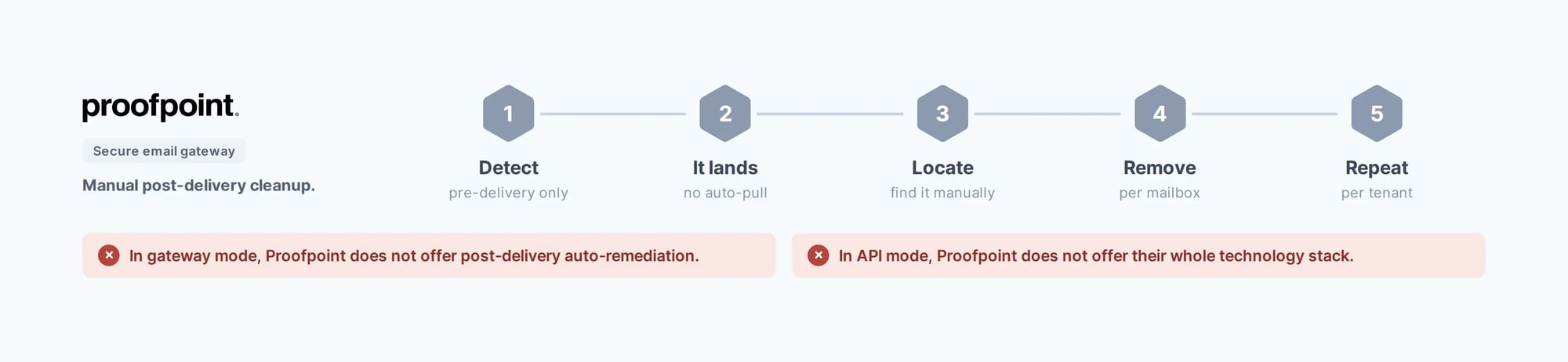
In gateway mode, Proofpoint does not offer post-delivery auto-remediation.
In API mode, Proofpoint does not offer their whole technology stack.

/Misc%20Icons/send-01.svg)
The Mail Path or Mailbox
IRONSCALES API-only connection. Mail never routes through its infrastructure, and MX records never change.
Proofpoint Gateway in the mail path. 365 Total Protection needs MX or Hybrid mode for its full feature set.
/Misc%20Icons/star-06.png?width=64&height=64&name=star-06.png)
Self-Learning
IRONSCALES Adaptive AI retrains on verdicts from 36,000+ analysts, so a threat caught once hardens detection everywhere.
Proofpoint Nexus AI and the Vade engine behind 365 Total Protection run on their own telemetry, with no analyst-in-the-loop network.
/Misc%20Icons/pie-chart-02.png?width=64&height=64&name=pie-chart-02.png)
Platform or Bundle
IRONSCALES Detection, simulation, SAT, DMARC, and outbound encryption in one simple console.
Proofpoint Simulation and SAT are separate lines, and 365 Total Protection bundles awareness as a distinct service.
/Misc%20Icons/zap-fast.png?width=64&height=64&name=zap-fast.png)
Threat Remediation
IRONSCALES Clusters related threats and removes them across every mailbox automatically, 30 minutes down to 30 seconds.
Proofpoint Post-delivery removal only in 365 Total Protection's API mode, and none when it runs as a gateway.
.svg)
.svg)
.svg)
.svg)
.svg)
.svg)


Advanced Threat Protection
/protect_better.webp?width=1000&height=681&name=protect_better.webp)
SOC Automation
Slash the time your team spends remediating email incidents from 30 minutes per incident to 30 seconds.
Our Adaptive AI scans every email for malicious indicators. When it finds a threat, it doesn’t just block it, it automatically finds and remediates all others like it in your environment.
/simplify_operations.webp?width=1480&height=1448&name=simplify_operations.webp)
HUMAN RISK MANAGEMENT
Triple the email security awareness of your workforce and transform your employees into a crucial line of phishing defense. We make it dead simple to sharpen your employees' understanding of real-world threats with:
- Phishing simulation testing
- Security awareness training (SAT)
- Dynamic email banners
...and a GPT-powered chat assistant
/empower_your_org.webp?width=957&height=850&name=empower_your_org.webp)
Case Studies

/telit_square_hero.webp)
/valley_ent_webp_.webp)


/alchemist_square_hero.webp)
/webhelp_square_hero.webp) ADVANCED THREAT DETECTION
ADVANCED THREAT DETECTION
Explore the Future of Email Security — Get a Demo Today
Experience our AI-driven, cloud-based email security platform. We'll show you how artificial intelligence and human insights collaborate to stop sophisticated attacks in their tracks.
Get a Demo!
Eyebrow