






Stop Email Attacks.
Dead In Their Tracks.
Get better protection, simplify your operations, and empower your organization against advanced threats today.

Learn how global companies are transforming their email security to tackle modern threats
Learn how MSPs can revolutionize their email security and profitably grow their businesses
Secure email gateways and API-based solutions compared for enterprises and MSPs.

Our agents work in concert to anticipate attacks, investigate threats, and educate users
Researches your org like an attacker would, then blocks those threats before they arrive

L2-level forensic investigation across five tracks. Clear verdict in minutes.
Hyper-personalized simulations targeting your highest-risk employees with real OSINT
Stop attacks like BEC, VEC, and VIP impersonation
Continuously protect against malicious links and attachments
Use Agentic ATO to detect and stop account takeover attacks
Encrypt outbound email and meet compliance, automatically
The attacker signs in with real credentials, so the alert looks like every other unusual sign‑in in the queue.
If you can draw a flowchart of how a tool works, it's automation. Agentic ATO picks the checks each case needs, reads the results and follows the evidence where it leads.
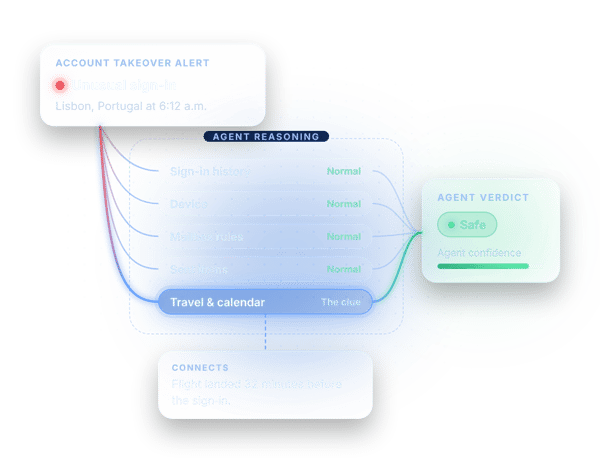
Someone signs in to your controller's mailbox from Lisbon. Your account takeover detection flags it, and now someone has to work out whether that's an attacker or a controller at a conference.
Agentic ATO reads the alert and writes its own plan. Portugal is new for this user, so it asks what a senior analyst would ask first: is this person traveling?
The agent checks each topic and marks it suspicious, looks normal or inconclusive. Then it connects the dots, like whether a flight on the calendar lines up with the time of the sign-in.
Every verdict comes back safe or compromised, with a confidence score, the evidence and a plain-language explanation your analyst can check in a minute.
In auto mode, a compromised verdict blocks the user and closes all active sessions, and a safe verdict classifies the incident. Change the facts above to see both outcomes.
Sign-in from Lisbon, Portugal at 6:12 a.m.
The open question. Is this an attacker, or a controller who flew to Lisbon for a conference?
The sign-in came 32 minutes after the user's flight to Lisbon landed, and a hotel booking covers these dates. The device, mailbox rules and sent items all match how this user normally works.
There is no trip on the calendar, the device is new, a rule now forwards mail outside the company, and the account sent a burst of messages to finance right after the sign-in.
Your analyst can reverse any call. Marking a case Safe can unblock the user in the same save.
Ironscales flags takeovers from user behavior, such as new forwarding rules, auto-delete rules, impossible travel and shifts in how an account sends. Agentic ATO adds the investigation that used to wait for an analyst.
| Attribute | Agentic ATO |
|---|---|
| Job | Prove whether the account is compromised |
| Output | A verdict of safe or compromised, with a confidence score, the evidence and the reasoning |
| Next step | Auto mode acts, or Suggest mode recommends and your analyst decides |
| Sensitivity | Relaxed, Balanced or Aggressive, the same setting your detection uses |
Agentic ATO works with Microsoft 365 for customers with Ironscales Account Takeover protection, with nothing to install.
Auto mode is on by default, and every setting stays in your hands under Settings, Account takeover.
What is Agentic ATO?
Agentic ATO is a capability in Ironscales Account Takeover protection. It investigates each account takeover alert the way an analyst would, then returns a verdict of safe or compromised with a confidence score, the evidence and its reasoning in plain language.
How does Ironscales detect and prevent account takeover attempts?
Ironscales builds a baseline of how each user signs in, works and sends email, and flags deviations that may signal a takeover. Agentic ATO then investigates each alert, chooses the checks the case needs and returns a verdict of Safe or Compromised with the evidence and its reasoning.
What makes Agentic ATO agentic?
It decides its own steps. Agentic ATO reads the alert, picks the checks the case needs, reads the results and follows the evidence. Sent items and travel and calendar appear on every incident, and the rest is the agent's call.
What are the signs of an ATO attack that Ironscales can catch?
Ironscales looks for changes in established user behavior, such as new devices or locations, abnormal sign-in patterns, unusual sending behavior or unexpected shifts in communication timing. It weighs these signals together to identify activity that may signal an account takeover.
What does Agentic ATO check?
It chooses from sign-in history, devices, mailbox rules, sent items, the calendar and how peers behave, based on what each alert needs to answer.
How does Ironscales respond once a compromised account is detected?
In auto mode, which is on by default, a Compromised verdict blocks the user and closes all active sessions, and a Safe verdict classifies the incident. You choose the actions, and your analyst can reverse any call. Turn auto mode off for Suggest mode, where your analyst makes every final call. Your team can also remove related messages from affected inboxes.
How do analysts give feedback to Agentic ATO?
Analysts mark a case safe or compromised, or give it a thumbs up or down with an optional comment. Those classifications and that feedback go to the agent for your tenant.
Who gets notified when Agentic ATO makes a call?
On the Alerts & notifications page, you choose who gets an email and for which agent events: auto-resolved compromised, auto-resolved safe, or “Case needs my review” in Suggest mode.
Does Ironscales require specific Microsoft licenses for account takeover protection?
No. Ironscales account takeover protection, Agentic ATO included, works with Microsoft 365 without requiring specific Microsoft security licenses. It monitors account behavior and activity on its own, so you can deploy it consistently across your Microsoft licensing mix.
Can Ironscales stop internal phishing emails from compromised employee accounts?
Yes. Ironscales scans both inbound and internal messages. If a compromised user starts sending phishing emails internally, the platform can detect and remove related messages across affected inboxes before the attack spreads.
Does Ironscales integrate with other security tools for coordinated incident response?
Yes. Ironscales integrates with SIEM, SOAR and IAM tools, and Security Event Forwarding (SEF) sends Ironscales security events to the tools your team already runs. Account takeover detection lines up with your identity protection, endpoint monitoring and security orchestration platforms.
What role do employees play in helping stop account takeover attacks?
Employees report suspicious messages with the Report Phishing button. Ironscales analyzes each report in context and, when it confirms a threat, applies the right response across the environment. That surfaces compromised accounts earlier and cuts attacker dwell time.
Get better protection, simplify your operations, and empower your organization against advanced threats today.