TL;DR A free Gmail account impersonated a real outside-counsel attorney using exact display-name spoofing, then sent a single vague note referencing an old dinner reservation. There was no link, no attachment, no credential prompt, and no payment request. The whole message was engineered to earn one trusting reply before the real pretext arrived. Every authentication check passed cleanly, because the mail genuinely came from Gmail. Only a relationship-graph signal caught the mismatch between a trusted contact's name and an unfamiliar sending address.
Severity: High Display-Name-Impersonation Business-Email-Compromise Social-Engineering-Recon MITRE: T1566 MITRE: T1585.002
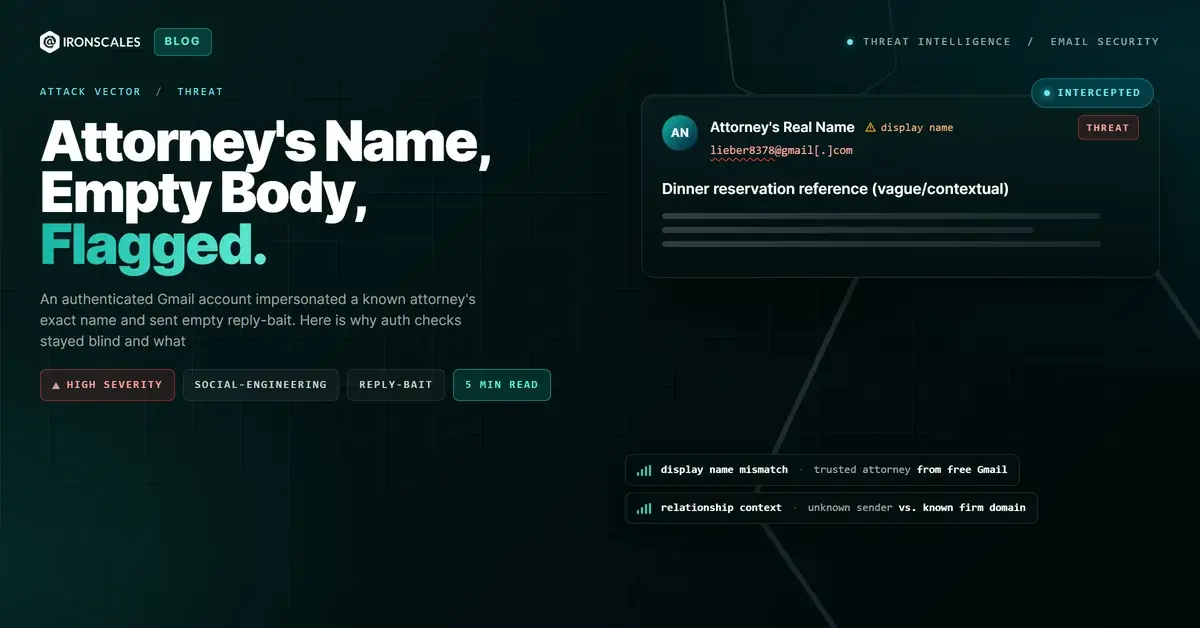
The email that landed in the inbox of an employee at a company that engages outside legal counsel did almost nothing. There was no invoice. There was no shared document, no login page, no urgent wire request. The body was effectively empty. The only content that mattered was in two places most people never scrutinize: the sender's display name and the subject line. The display name was the full name of a partner at the recipient's outside law firm, a real attorney the organization actually worked with. The subject line referenced a dinner reservation from about a week earlier. That was the entire attack.
Or rather, that was the entire opening move. Because this message was never meant to steal anything on its own. It was bait for a reply.
The email that asked for nothing
When we tell people to watch for phishing, we train them to look for the ask. The malicious link. The attachment that will not open unless you enable content. The account that has supposedly been suspended. Those are the artifacts a scanner can inspect and a suspicious human can catch.
This message deliberately carried none of them. The HTML body was a blank container with no text, no buttons, and no call to action. There was nothing for a link scanner to detonate and nothing for an attachment sandbox to open. To an automated gateway, there was quite literally nothing suspicious to examine, because the payload was not a file or a URL. The payload was an identity and a plausible reason to respond.
The vague reference to a recent dinner reservation is what makes this effective. It reads like the loose thread of a real, ongoing relationship. A partner you know reaches out about something you might reasonably have discussed. The natural human response is not alarm. It is a quick, friendly reply: "Sorry, remind me which reservation?" And with that reply, the attacker has what they came for. A live, trusting thread with a target who now believes they are talking to their attorney.
Why every authentication check waved it through
Here is the uncomfortable part for anyone who leans on email authentication as a primary defense. This message passed cleanly.
SPF passed. DKIM passed. DMARC passed, aligned to gmail.com. None of that is a bug or a bypass. The mail genuinely originated from Google's infrastructure through a real Gmail account, so of course it authenticated as Gmail. SPF, DKIM, and DMARC exist to answer one question: did this message really come from the domain it claims to come from? The honest answer here was yes. The account was lieber8378[@]gmail[.]com, a legitimate, fully authenticated free-mail address.
Authentication never asks the question that actually mattered: who will the human on the other end believe they are reading? The answer to that lived entirely in the display-name layer, which no authentication protocol inspects. The attacker set the friendly name to the attorney's real full name. On a phone, where the raw address is often hidden behind that friendly name, the recipient sees a trusted contact and nothing else.
This is the core lesson of display-name impersonation, and it is why it remains one of the most durable techniques in the phishing playbook. The 2024 Verizon Data Breach Investigations Report found the human element present in 68 percent of breaches, and named pretexting, which is largely business email compromise, the top social-engineering pattern, with a median BEC transaction near 50,000 dollars. The 2023 FBI Internet Crime Report attributed roughly 2.9 billion dollars in losses to BEC. Those numbers are not built on exotic malware. They are built on messages exactly like this one, where a trusted-sounding identity does all the work and the technical controls have nothing to flag.
Recon before the real ask
It helps to reframe what happened here. This was not a failed attack that forgot to include a payload. It was a successful first step in a longer sequence. Security teams sometimes call this reply-bait: a low-friction message whose only goal is to open a conversation.
Once a target replies, several things change in the attacker's favor. The thread now carries the target's own words and often their real signature. The attacker can escalate gradually, matching tone and context, before introducing the pretext that actually costs money, a revised invoice, a change of payment details, a confidential document request framed as a favor for the firm. By the time the ask arrives, it is riding on a conversation the victim started and trusts. The MITRE ATT&CK framework catalogs this identity-first approach across techniques like phishing (T1566) and the establishment of throwaway email accounts under T1585.002. CISA's guidance on stopping the phishing attack cycle emphasizes exactly this pattern: the initial contact is often harmless-looking by design.
The signal that was actually there
If the email authenticated perfectly and carried no malicious artifact, what was left to catch it? Relationship context.
The organization already had a contact record for the real attorney, tied to that attorney's actual firm domain. Our Adaptive AI email security models those relationships as a graph: who normally corresponds with whom, and from which addresses. When a message arrived carrying the attorney's exact display name from a free Gmail address the platform had never seen associated with that person, the mismatch surfaced. Themis flagged it at 53 percent confidence, a deliberately behavioral call rather than a technical one, because every technical check was clean and gave the system nothing else to work with.
That 53 percent is worth sitting with. It is not the confident 90-plus you see when a scanner finds a known-bad URL. It is the measured uncertainty appropriate to a message that is, technically, indistinguishable from a legitimate one. The only anomaly was the human relationship it tried to borrow, and that is precisely the layer that legacy gateways and authentication stacks cannot see.
Indicators of Compromise
| Type | Indicator | Context |
|---|
| Sender account | lieber8378[@]gmail[.]com | Authenticated free Gmail account; a known attorney's full name set as the display name |
| Display-name impersonation | Real outside-counsel attorney's full name | Friendly From name matched a trusted contact; the actual address was unrelated |
| Authentication result | SPF pass, DKIM pass, DMARC pass (aligned to gmail.com) | Genuinely sent through Google; auth validated the domain, not the identity |
| Payload | None — empty HTML body, no link or attachment | Reply-bait; the real ask is deferred until the target responds |
| Lure | Subject referencing a roughly week-old dinner reservation | Loose-thread pretext engineered to earn one trusting reply |
| Detection signal | Themis 53% (relationship-graph anomaly) | Known contact's name arriving from an address never before associated with them |
What defenders should take from this
Treat display-name trust as something to verify, not assume, especially on mobile clients that hide the underlying address. When a known contact reaches out from an unfamiliar address, even to say something as innocent as "about that reservation," the safe move is to confirm through a known channel before replying. A vague, contextless note from a trusted name is not a reason to relax. It is a reason to look closer.
For the organization, the defensive posture has to extend past authentication. SPF, DKIM, and DMARC are necessary, and you should absolutely enforce them, but this case is a clean demonstration of their ceiling. Pair them with relationship-aware detection that understands your actual contact graph, and reinforce it with phishing simulation testing that trains people on identity-based lures, not just link-and-attachment scares. That combination is what turns an empty, perfectly authenticated reply-bait message from a missed opportunity into a caught one, and it is the foundation of durable business email compromise protection.
The attacker here understood something worth remembering: the most dangerous email is often the one that asks for nothing at all.
Email Attack of the Day is a daily series from
IRONSCALES spotlighting real phishing attacks caught by Adaptive AI and our community of 36,000+ security professionals. Each post breaks down a real attack. What it looked like, why it worked, and what to do about it.







/Blue%20Feature%20Flower%20Icons/gear%20head%20icon.svg)
/Misc%20Icons/icon-nav-credential-theft.svg)










/Leadership%20Headshots/Audian%20Paxson%20Headshot%201000x1000%20032026.webp?width=100&height=100&name=Audian%20Paxson%20Headshot%201000x1000%20032026.webp)



.png?width=50&height=50&name=Untitled%20-%20July%2030%2c%202026%20at%2014.53.38%20(3).png)



/Misc%20Icons/icon-red-teaming-agent-gradient-simple.svg)
/Misc%20Icons/icon-phishing-soc-agent-gradient-simple.webp?width=158&height=167&name=icon-phishing-soc-agent-gradient-simple.webp)
/Misc%20Icons/icon-phishing-simulation-agent-gradient-simple.svg)


/Misc%20Icons/icon-nav-encryption.svg)