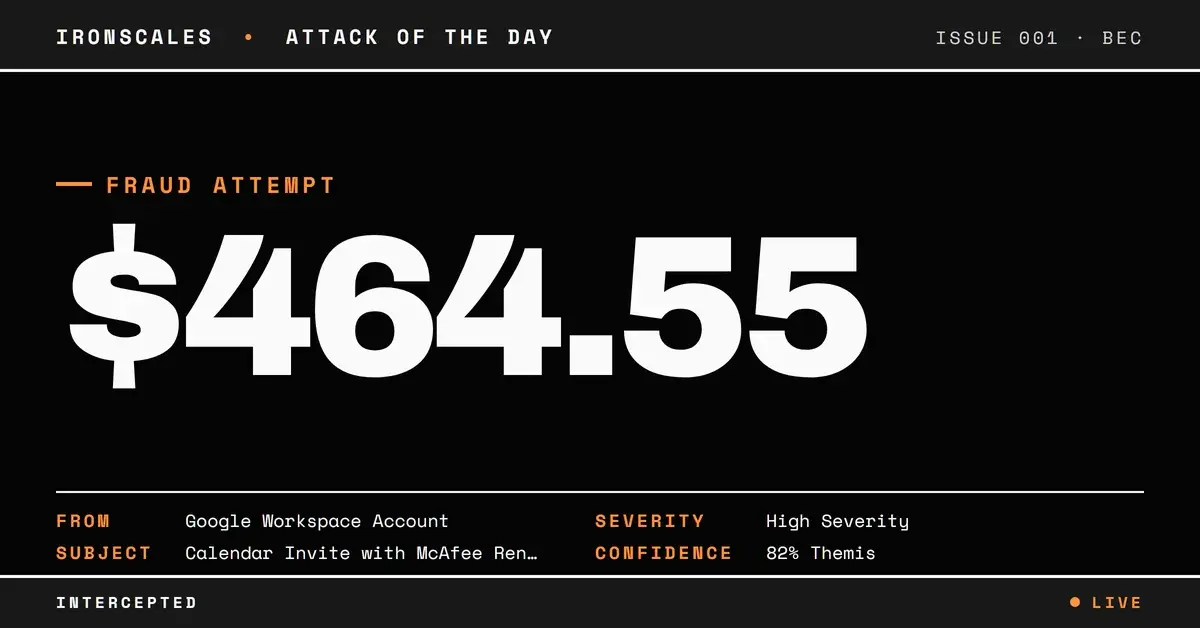
TL;DR A calendar invite (.ics) delivered a fraudulent McAfee renewal invoice and a support phone number straight to a senior executive's inbox. The message passed SPF, DKIM, and DMARC through an abused Google Workspace account and scored clean at the gateway, because the payment demand lived in the calendar event description rather than the email body or a link. This is callback phishing wearing a scheduling wrapper. Detection required behavioral signals, not reputation or link scanning: an external first-time organizer, a VIP target, and invoice language where a meeting agenda should be.
Severity: High Bec Callback Phishing Brand Impersonation MITRE: T1566.001 MITRE: T1566 MITRE: T1684.001
The attachment was a calendar invite. 1,526 bytes, verdict clean, every link pointing to calendar[.]google[.]com. It sailed through authentication with a perfect score: SPF pass, DKIM pass, DMARC pass, compauth=100. Microsoft 365 assigned it a spam confidence level of 1 and dropped it in the inbox of a senior commercial leader at a global life sciences company.
Inside that invite was a fake McAfee renewal invoice for $464.55 and a phone number.
No malicious URL. No malware. No credential-harvesting page. The entire payload was text, sitting in the one place almost no scanner reads and no awareness program covers: the description field of a calendar event, delivered as a .ics file.
The Blind Spot Between Email and Calendar
A .ics file is the standard format for calendar invitations. When a Google Calendar invite arrives, the platform mirrors the event details, including the free-text description, into the message the recipient sees. Attackers figured out that this description field is a trust gap. Email security tools scrutinize body copy, attachments, and links. Calendar event descriptions are treated as scheduling metadata, not content to inspect for fraud.
Security awareness training has the same gap. Employees are drilled on suspicious links, spoofed sender names, and unexpected PDF attachments. Almost no program teaches people to be suspicious of the text buried in a meeting invite. The invite here even carried a blank event title, a formatting tell that would look odd to a human but means nothing to a filter parsing structured calendar data.
So the fraud walked in through a door nobody was watching.
The Payload Was a Phone Number
The invoice claimed to be an "Official Renewal Invoice" from McAfee for $464.55. Below it sat a US phone number. That number, not a link, was the actual attack.
This is callback phishing, sometimes called telephone-oriented attack delivery, or TOAD. Instead of routing the victim to a web page a scanner could analyze, the attacker moves the interaction to a live phone call. Someone answers, poses as billing support, and walks the target through a "refund" or "renewal correction" that ends in a wire transfer, a gift-card purchase, or remote-access software on the endpoint. None of that touches email infrastructure, so none of it can be scanned.
The brand choice was deliberate. Fake antivirus and subscription-renewal invoices are one of the most reported impersonation scams tracked by the Federal Trade Commission, precisely because a modest, plausible charge like $464.55 is more likely to trigger a confused phone call than a five-figure demand would. The 2024 Verizon Data Breach Investigations Report identifies pretexting, most of it BEC, as the top social-engineering incident type, and callback lures are a category built specifically to bypass link and attachment analysis. The FBI's 2023 Internet Crime Report tied business email compromise and related invoice fraud to more than $2.9 billion in reported losses, and the mechanics almost always begin with a message that looked routine.
Authenticated, and That Was the Point
Here is the part that should worry every security team: this message did not spoof anything. It authenticated cleanly.
The invite was sent from a compromised but legitimate Google Workspace account belonging to an educational institution. Because the mail left through Google's own infrastructure, it inherited that domain's SPF authorization, valid DKIM signatures, and a passing DMARC result. The recipient gateway confirmed all three and recorded compauth=100, the highest composite authentication score Microsoft assigns.
Authentication was never designed to measure intent. SPF, DKIM, and DMARC answer one question: was this message sent from infrastructure authorized for the sending domain, and did it arrive unaltered? When an attacker rides in on a hijacked real account, the honest answer is yes. The controls do exactly what they were built to do and still let the fraud through. This is why account takeover of one organization so often becomes the delivery mechanism for an attack on the next. If your defense strategy assumes a passing DMARC check means safe, you have outsourced your trust decision to whoever last had their password phished.
What the Gateway Scored Clean, Themis Scored as Phishing
The gateway did its job and passed the message. The behavioral layer did not.
IRONSCALES flagged the invite at 82 percent confidence and resolved it as phishing before the recipient acted, based on signals authentication cannot see. The organizer was external and a first-time sender to this mailbox, with no prior correspondence in either direction. The recipient was a senior executive, a classic high-value target. And the content did not match its container: invoice and payment language where a meeting agenda belonged. The Adaptive AI engine weighed those factors together, cross-referenced them against patterns reported by the global IRONSCALES community, and reached a verdict opposite to the one the authentication stack produced. Themis, the agentic AI analyst behind that decision, remediated the message automatically rather than routing it to a queue. You can see how that behavioral model works across the IRONSCALES platform.
The lesson is not that the gateway failed. It is that reputation and authentication are the wrong tools for an attack that carries no bad reputation and perfect authentication. This is exactly the kind of message a secure email gateway is structurally built to miss.
See Your Risk: Calculate how many threats your SEG is missing
Indicators of Compromise
| Type | Indicator | Context |
|---|
| Sending domain | iem[.]edu[.]in | Compromised Google Workspace (education) account used to send the invite |
| Sender IP | 209[.]85[.]167[.]202 | Google mail infrastructure (mail-oi1-f202[.]google[.]com) |
| Attachment | invite.ics (application/ics, 1,526 bytes) | Calendar invite carrying the invoice payload; scanner verdict clean |
| Callback number | +1-859-222-1682 | Fraudulent McAfee "billing support" number in the event description |
| Impersonated brand | McAfee | Fake "Official Renewal Invoice" for $464.55 |
| Delivery surface | Calendar event description (.ics) | Payload text living outside the scanned email body |
MITRE ATT&CK Mapping
Closing the Calendar Gap
Three moves make this class of attack far harder to land.
Inspect calendar content, not just email content. Treat .ics attachments and calendar event descriptions as inspectable message body, subject to the same fraud, brand-impersonation, and callback-number analysis you apply to normal mail. If your current tool cannot see inside the invite, that is the gap.
Do not treat authentication as a verdict. SPF, DKIM, and DMARC are necessary, and you should still enforce them through active DMARC management. But a passing result is a data point, not a safety guarantee, especially when the sender is a first-time external organizer. Weight behavioral signals over reputation.
Train people on the phone as an attack surface. Vishing and callback lures succeed because a live, reassuring voice defeats skepticism that survived the inbox. Teach employees that an unexpected invoice with a number to call is a stop signal, and give them a fast, blameless way to report it.
The attacker who built this invite understood something defenders keep relearning: the strongest lure is the one that arrives through a channel you forgot to watch.
Email Attack of the Day is a daily series from
IRONSCALES spotlighting real phishing attacks caught by Adaptive AI and our community of 36,000+ security professionals. Each post breaks down a real attack. What it looked like, why it worked, and what to do about it.







/Blue%20Feature%20Flower%20Icons/gear%20head%20icon.svg)
/Misc%20Icons/icon-nav-credential-theft.svg)










/Leadership%20Headshots/Audian%20Paxson%20Headshot%201000x1000%20032026.webp?width=100&height=100&name=Audian%20Paxson%20Headshot%201000x1000%20032026.webp)



.png?width=50&height=50&name=Untitled%20-%20July%2030%2c%202026%20at%2014.53.38%20(3).png)



/Misc%20Icons/icon-red-teaming-agent-gradient-simple.svg)
/Misc%20Icons/icon-phishing-soc-agent-gradient-simple.webp?width=158&height=167&name=icon-phishing-soc-agent-gradient-simple.webp)
/Misc%20Icons/icon-phishing-simulation-agent-gradient-simple.svg)


/Misc%20Icons/icon-nav-encryption.svg)