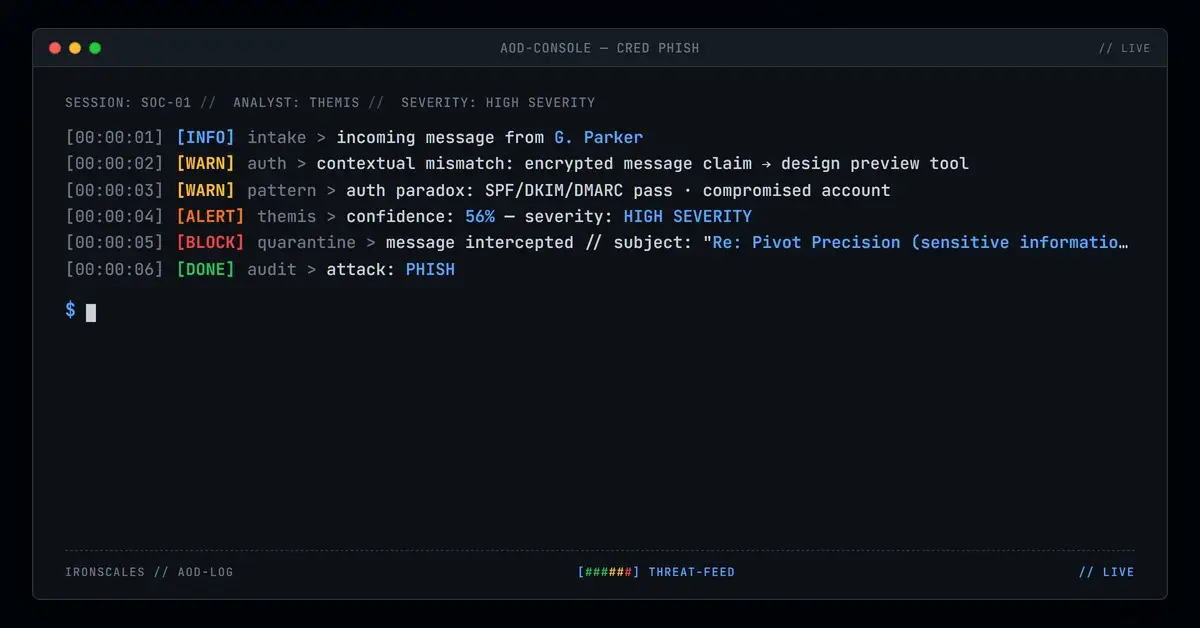
TL;DR An email claiming to be an encrypted message from a manufacturing company directed two recipients at a door installation firm to a MagicPatterns design preview URL instead of Microsoft's standard secure message viewer. The message passed full SPF, DKIM, and DMARC authentication from the sender's M365 tenant, and included an expiration date to create urgency. The named sender could not be verified in public staff listings, and the signature phone number contained a formatting anomaly. SafeLinks wrapped the MagicPatterns URL with the recipient's email embedded in the parameters. Adaptive AI flagged credential theft indicators at 56% confidence.
Severity: High Credential Harvesting Platform Abuse MITRE: T1566.002 MITRE: T1586.002 MITRE: T1608.005
When a user receives an email claiming to contain an encrypted message, they expect the link to open Microsoft's secure message viewer or a similar enterprise portal. This email directed recipients to a page hosted on MagicPatterns, a design preview platform used by UI/UX developers to share interactive mockups. The disconnect between the claim ("encrypted message") and the destination (design tool) is the entire detection surface for this attack, because everything else about the email was technically clean.
The message passed SPF, DKIM, and DMARC authentication with a composite authentication score of 100. It originated from a legitimate Microsoft 365 tenant. SafeLinks wrapped the URL and returned a clean verdict. Two mailboxes at a mid-size door installation company were affected before the incident was escalated and quarantined.
An Encrypted Message With a Third-Party Destination
The email arrived from gparker@pivotprecision[.]com with the subject line "Re: Pivot Precision (sensitive information and details included)." The "Re:" prefix implied an ongoing conversation. The body was terse: a notification that an encrypted message was available, a "Click here" link to view it, and an expiration date of April 28, 2026. A signature block included the company name, a physical address in Lockport, New York, and a phone number.
The address in the signature matched public records for the manufacturing company. The phone number, however, contained a formatting anomaly: (716) 625--0800 (double dash) versus the company's publicly listed number, (716) 625-8000. Small discrepancies like this are common in phishing campaigns that copy legitimate signature blocks but introduce errors during templating.
A public identity search for the named sender returned no verifiable match in the company's staff listings. The incident metadata flagged the sender as high risk, and the message carried three tags: Suspicious Link, Suspicious Sender, and Suspicious Message.
See Your Risk: Calculate how many threats your SEG is missing
MagicPatterns as a Credential-Harvesting Host
Both links in the email pointed to the same MagicPatterns preview URL: hxxps://www[.]magicpatterns[.]com/c/akarpukybcv7blhyvnb9ih/preview with query parameters disabling comments, hiding the toolbar, and showing a device frame. These parameters are standard for MagicPatterns embeds and suggest the attacker configured the preview to look like a standalone application rather than a development tool.
MagicPatterns is a legitimate platform. Its domain has a clean reputation. Automated scanners evaluating the URL returned "Clean" verdicts because the domain itself is not associated with phishing infrastructure. The malicious content, if present, lives in the user-generated preview page, not in the platform's domain reputation.
This is the same pattern seen with other platform-abuse attacks using Cloudflare Pages, Netlify, Render, and Webflow. Attackers host credential-collection forms on platforms that provide free hosting, clean domain reputation, and HTTPS certificates. The phishing page inherits the trust of the hosting platform.
SafeLinks rewrote the URL on delivery, wrapping it in a nam12[.]safelinks[.]protection[.]outlook[.]com redirect. The SafeLinks parameters included the recipient's email address in the encoded data field. If the MagicPatterns page was configured to read URL parameters, the attacker could pre-populate a fake login form with the recipient's address, making the credential prompt appear personalized.
Authentication That Confirmed the Wrong Thing
The email transited Microsoft's outbound protection infrastructure from the pivotprecision[.]com tenant. SPF passed. DKIM passed under the pivotpunch[.]onmicrosoft[.]com selector. DMARC passed with p=QUARANTINE. ARC seals validated across two hops. The composite authentication result was compauth=pass reason=100, the highest trust score available.
These results confirm that the message originated from the claimed M365 tenant. They do not confirm that the account holder sent the message intentionally. The most plausible explanations are either a compromised account being used to send authenticated phishing or a legitimate account misused by an insider. Either way, the authentication signals work against the defender because they produce a high-trust evaluation for a message that contains a credential-harvesting link.
IRONSCALES Adaptive AI evaluated the message at 56% confidence and flagged credential theft indicators. The behavioral signals included the contextual mismatch between an "encrypted message" notification and a third-party design preview URL, combined with the unverifiable sender identity and high-risk metadata. Two mailboxes were quarantined after analyst review.
MITRE ATT&CK Alignment
| Technique | ID | Application |
|---|
| Phishing: Spearphishing Link | T1566.002 | Encrypted-message lure linking to design preview platform |
| Compromise Accounts: Email Accounts | T1586.002 | Likely compromised M365 tenant used for authenticated delivery |
| Link Target | T1608.005 | MagicPatterns preview page as credential-harvesting host |
IOC Summary Table
| Type | Indicator | Context |
|---|
| Sending Email | gparker@pivotprecision[.]com | Likely compromised M365 account |
| Sending Domain | pivotprecision[.]com | Legitimate manufacturing company domain |
| DKIM Selector | selector1-pivotpunch-onmicrosoft-com | M365 tenant DKIM |
| Payload URL | hxxps://www[.]magicpatterns[.]com/c/akarpukybcv7blhyvnb9ih/preview | Design preview tool hosting phishing content |
| SafeLinks Wrapper | nam12[.]safelinks[.]protection[.]outlook[.]com | URL rewrite with recipient email in parameters |
| SPF Result | Pass | Sender IP authorized by pivotprecision.com SPF |
| DKIM Result | Pass | Valid signature under pivotpunch.onmicrosoft.com |
| DMARC Result | Pass (p=QUARANTINE) | Full alignment, compauth=100 |
| Signature Phone | (716) 625--0800 | Double-dash formatting anomaly vs. public listing |
When the Platform Is Clean but the Page Is Not
Blocking MagicPatterns at the domain level would disrupt legitimate design workflows. The phishing content is in a specific user-generated page, not in the platform itself. This forces a different detection strategy.
Flag encrypted-message notifications that link outside Microsoft's secure viewer. A legitimate Office 365 encrypted message opens at portal.office.com or a Microsoft-hosted page. Any "encrypted message" notification that directs to a third-party domain, regardless of that domain's reputation, should receive elevated scrutiny.
Evaluate SafeLinks parameter leakage. When SafeLinks wraps a URL and includes the recipient's email address in the redirect parameters, that address becomes available to the landing page. Consider whether your SafeLinks configuration leaks recipient data to third-party destinations.
Treat signature anomalies as a supplementary signal. A phone number with a double dash, a mismatched area code, or a formatting inconsistency between the signature and public records is a low-confidence but low-cost signal. Combined with an unverifiable sender identity and a suspicious link, it contributes to a classification decision.
Email Attack of the Day is a daily series from
IRONSCALES spotlighting real phishing attacks caught by Adaptive AI and our community of 36,000+ security professionals. Each post breaks down a real attack. What it looked like, why it worked, and what to do about it.







/Blue%20Feature%20Flower%20Icons/gear%20head%20icon.svg)
/Misc%20Icons/icon-nav-credential-theft.svg)










/Leadership%20Headshots/Audian%20Paxson%20Headshot%201000x1000%20032026.webp?width=100&height=100&name=Audian%20Paxson%20Headshot%201000x1000%20032026.webp)



.png?width=50&height=50&name=Untitled%20-%20July%2030%2c%202026%20at%2014.53.38%20(3).png)



/Misc%20Icons/icon-red-teaming-agent-gradient-simple.svg)
/Misc%20Icons/icon-phishing-soc-agent-gradient-simple.webp?width=158&height=167&name=icon-phishing-soc-agent-gradient-simple.webp)
/Misc%20Icons/icon-phishing-simulation-agent-gradient-simple.svg)


/Misc%20Icons/icon-nav-encryption.svg)