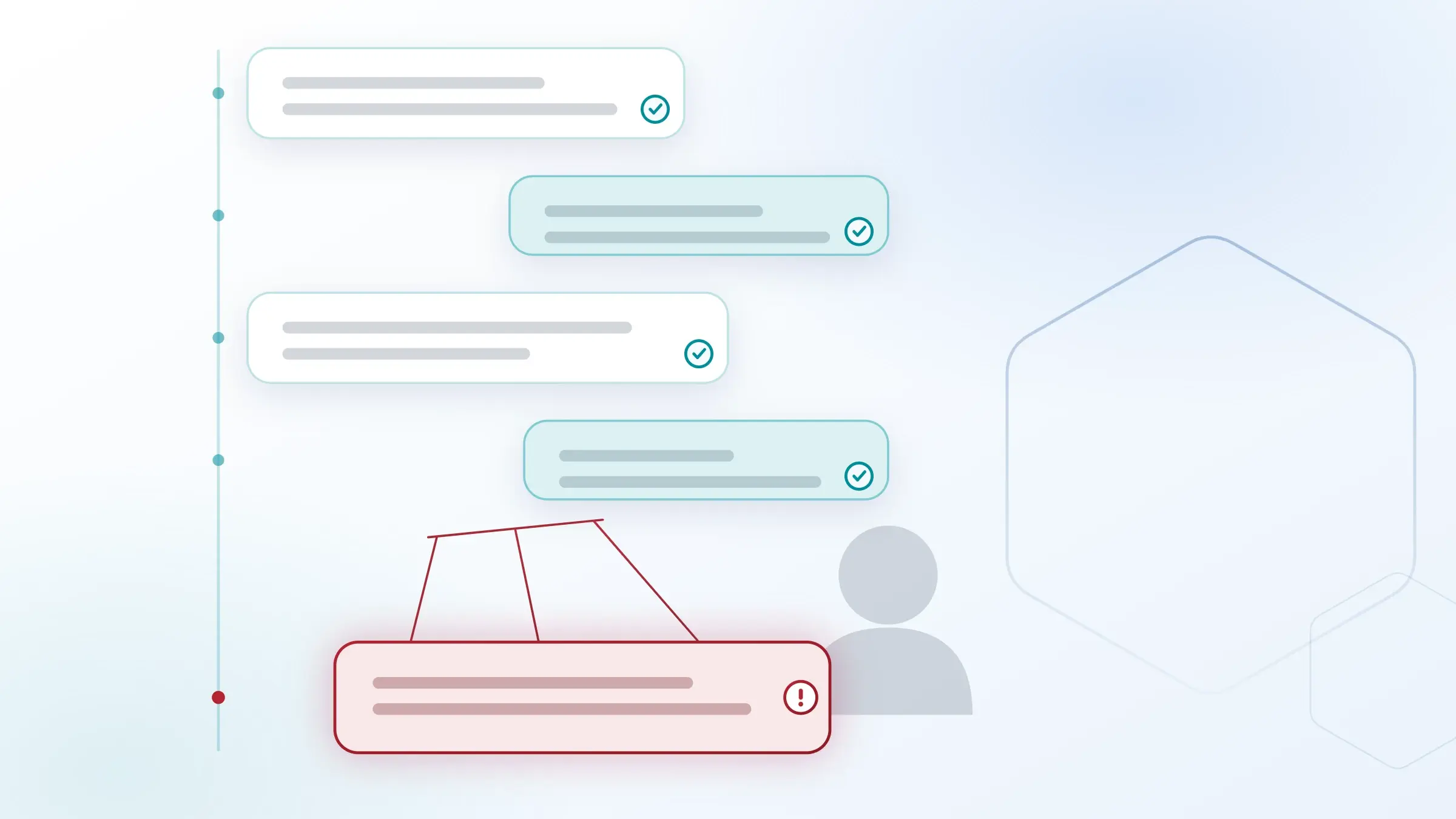
Email conversation takeover is a post-compromise attack where an adversary who already controls a legitimate mailbox hijacks an active email thread and inserts fraudulent replies from a sender the recipient already trusts. Because the account is real and the thread is real, the messages pass SPF, DKIM, and DMARC and arrive looking exactly like the conversation they belong to. You detect it by analyzing how the account and the thread normally behave, not by scanning message content.
The rest of this guide covers what the attack looks like, why gateways and native filters miss it, the specific signals that expose it, how to detect it inside Microsoft 365 and Google Workspace, and what to do the moment a hijacked thread is confirmed.
What email conversation takeover is
Email conversation takeover (also called conversation hijacking or email thread hijacking) is the reply-stage payoff of an account takeover. The attacker compromises a mailbox through phishing, credential theft, or a stolen session token, reads the victim's real conversations, and then replies inside an existing thread to redirect a payment, request credentials, or deliver a malicious link. The trust is inherited from the thread, so the recipient has little reason to question it.
Three properties make the attack effective:
- The sender is authentic. The message comes from a real, authenticated account, so authentication checks pass and reputation filters see a known-good sender.
- The context is real. The attacker replies inside genuine history, matching subject lines, signatures, tone, and prior participants.
- The ask is timed. Hijacked threads usually target an in-flight transaction, an invoice, a wire, a contract, or a shared credential, where a redirected instruction looks routine.
Conversation takeover is the mechanism behind many of the most expensive business email compromise (BEC) and vendor email compromise losses, because it removes the two things recipients normally rely on to spot fraud: an unfamiliar sender and an out-of-context request.
What Verizon said in their 2026 VDBIR report
Verizon's 2026 Data Breach Investigations Report found the human element in 62% of breaches, with social engineering the third most common pattern. It classifies this style of attack as pretexting: an attacker "on the other side of the... email thread" building a trusted relationship to get the victim to act. Credential abuse, the usual first step in a takeover, shows up in 39% of breaches.
Why gateways and native filters miss it
Secure email gateways and Microsoft 365 or Google Workspace native filtering miss conversation takeover because they inspect content and reputation, and a hijacked thread has clean content and a trusted reputation. There is no malicious attachment to detonate, no spoofed domain to flag, and no first-contact anomaly, because the sender has emailed this recipient many times before.
Microsoft 365 EOP misses roughly 293 phishing emails per 100 mailboxes every 30 days, and Google Workspace misses roughly 350 per 100 mailboxes, precisely because intent-based and post-compromise attacks carry no scannable payload. Legacy gateways were built for Phishing 1.0 (bad content). Conversation takeover is Phishing 2.0 and 3.0 (bad intent, executed from a real account), and it stays invisible to any control that trusts a message because the sender is known.
What Gartner® said in the 2026 Buyer's Guide for Email Security
"A solution must not only protect against external threats but also secure internal email traffic, a vector that some solutions fail to address out of the box."
Gartner®, Buyer's Guide for Email Security, Ashish Suraj Bhan, Nikul Patel, 3 February 2026.
Gartner is a trademark of Gartner, Inc. and/or its affiliates.
How email conversation takeover is detected: the signals
You detect email conversation takeover by baselining normal behavior for the account, the relationship, and the thread, then flagging deviations from that baseline. The detectable signals fall into three groups.
Account behavior signals
- A login appears from a new location, device, or impossible-travel pattern shortly before the suspicious reply.
- New or altered mailbox rules auto-forward, delete, or hide replies (a common move to keep the real user from seeing the fraud).
- The account sends at an unusual hour or volume, or messages recipients it never contacted before.
- A session behaves abnormally, which can indicate a stolen session token used to bypass the password and MFA.
Thread and relationship signals
- The reply changes payment details, banking information, or delivery instructions inside an existing thread.
- Language, tone, or sign-off drifts from the sender's established communication style.
- Participants are quietly added or removed, or a reply-to address differs from the display sender.
- A dormant thread reactivates suddenly with a time-sensitive financial ask.
Content and link signals
- A link resolves to a credential-harvesting page, including URLs already rewritten by an upstream gateway.
- An attachment or link is new to a thread that never carried them before.
- The message pressures speed or secrecy against the norm of that relationship.
No single signal is proof. Detection comes from correlating them: a new-device login, a new mailbox rule, and a changed payment instruction in the same thread is a hijack until proven otherwise.
Detecting conversation takeover in Microsoft 365 and Google Workspace
Detecting conversation takeover in Microsoft 365 and Google Workspace requires visibility into both mailbox activity and message behavior, because the attack spans the identity layer (the compromised login and rules) and the email layer (the fraudulent reply). Native audit logs record the sign-ins and rule changes, but they do not correlate that identity activity with the thread-level anomaly in real time, which is where most detection gaps live.
Effective detection in either environment connects three things: the authentication and session events on the account, the historical behavioral baseline for that sender and relationship, and the anomalies in the live thread. IRONSCALES operates at the inbox level through native API integration in both Microsoft 365 and Google Workspace, so it evaluates internal and external mail and the account's own behavior together, rather than inspecting messages in isolation at the gateway.
Post-delivery response: what to do when a thread is hijacked
The moment a conversation takeover is confirmed, contain the account and remove the fraudulent messages everywhere they landed, not just in the reporting user's inbox. Because the messages came from a trusted internal or partner account, the same hijacked reply often reaches many recipients at once, and each copy that remains is a live opportunity for loss.
An effective post-delivery response does four things in order:
- Remediate across every mailbox. Retract the fraudulent messages organization-wide, one inbox at a time is too slow when a hijacked reply hits dozens at once. Our Themis agentic SOC quarantines confirmed threats across every affected mailbox in under 30 seconds, down from about 30 minutes of manual work per incident.
- Contain the compromised account. Revoke sessions, force credential reset, and remove attacker-created mailbox rules so the takeover cannot continue.
- Investigate the blast radius. Our Phishing SOC Agent runs L2 analyst-level forensics in minutes to establish which threads, recipients, and instructions were touched.
- Warn downstream recipients. Notify external partners on the thread, since vendor conversation takeover propagates across organizations.
Detection without fast post-delivery remediation still leaves the fraud sitting in inboxes. The response speed is what turns a caught hijack into a non-event.
How IRONSCALES detects and stops conversation takeover
IRONSCALES detects and stops email conversation takeover by combining behavioral AI, account takeover protection, and automated post-delivery remediation in one API-based platform. Our Adaptive AI builds a communication baseline and social graph for every sender using NLP and NLU, so a reply that deviates from an established relationship is flagged even when the content looks clean and the sender is authenticated.
- Our Adaptive AI models normal behavior per account and relationship, then flags thread and sender anomalies that content filters cannot see.
- Account Takeover protection correlates suspicious logins, new mailbox rules, anomalous sending, and abnormal session behavior (including stolen session tokens that bypass a password and MFA) with the thread-level signals that indicate a hijack in progress.
- Our Themis agentic SOC quarantines confirmed threats across every affected mailbox in under 30 seconds, so a hijacked reply is removed everywhere it landed.
- Crowdsourced intelligence from 36,000+ security professionals across 18,000+ organizations sharpens detection as new takeover patterns emerge in the wild.
Behavioral-AI platforms like Abnormal take a similar detection-first approach to conversation takeover. IRONSCALES adds crowdsourced human intelligence, admin-configurable automation, and organization-wide remediation in under 30 seconds. IRONSCALES lets admins configure detection and remediate immediately, from full autopilot to human-in-the-loop, and protects from day one through crowdsourced verdicts and multi-engine scanning rather than a closed baselining period. IRONSCALES deploys in minutes through native API integration, with no MX record changes and no gateway.
Frequently asked questions
How do I detect conversation takeover emails?
Detect conversation takeover by baselining normal behavior for each account and relationship, then flagging deviations: a login from a new device or location, new or hidden mailbox rules, a changed payment or banking instruction inside an existing thread, and tone or sign-off that drifts from the sender's history. Correlate these signals rather than relying on any single one, because the sender is authenticated and the content looks clean.
What is the difference between conversation takeover and BEC?
Conversation takeover is a technique; BEC is the outcome. Business email compromise is the broad category of fraud that impersonates a trusted party to redirect money or data. Conversation takeover is one of the most effective ways to execute BEC, because the attacker sends from a genuinely compromised account inside a real thread instead of spoofing a lookalike domain.
Can Microsoft 365 or Google Workspace stop conversation takeover on their own?
Native filtering in Microsoft 365 and Google Workspace misses most conversation takeover because it inspects content and sender reputation, both of which are clean in a hijacked thread. Microsoft 365 EOP misses roughly 293 phishing emails per 100 mailboxes every 30 days and Google Workspace misses roughly 350, largely from intent-based and post-compromise attacks that carry no scannable payload.
What should I do after a hijacked thread is confirmed?
Retract the fraudulent messages across every affected mailbox, contain the compromised account (revoke sessions, reset credentials, remove attacker mailbox rules), investigate which threads and recipients were touched, and warn downstream partners on the thread. Organization-wide retraction matters because one hijacked reply usually reaches many recipients at once.
How is IRONSCALES different from Abnormal for conversation takeover?
IRONSCALES and Abnormal both use behavioral AI to detect conversation takeover. IRONSCALES adds crowdsourced threat intelligence from 36,000+ security professionals, gives admins configurable detection with automated organization-wide remediation in under 30 seconds, and starts protecting from day one through community-sourced verdicts and multi-engine scanning rather than requiring a closed baselining period before it can act.
GARTNER is a registered trademark and service mark of Gartner, Inc. and/or its affiliates in the U.S. and internationally and is used herein with permission. All rights reserved. Gartner does not endorse any vendor, product or service depicted in its research publications and does not advise technology users to select only those vendors with the highest ratings or other designation. Gartner research publications consist of the opinions of Gartner’s research organization and should not be construed as statements of fact. Gartner disclaims all warranties, expressed or implied, with respect to this research, including any warranties of merchantability or fitness for a particular purpose.







/Blue%20Feature%20Flower%20Icons/gear%20head%20icon.svg)
/Misc%20Icons/icon-nav-credential-theft.svg)










/Leadership%20Headshots/Audian%20Paxson%20Headshot%201000x1000%20032026.webp?width=100&height=100&name=Audian%20Paxson%20Headshot%201000x1000%20032026.webp)



.png?width=50&height=50&name=Untitled%20-%20July%2030%2c%202026%20at%2014.53.38%20(3).png)



/Misc%20Icons/icon-red-teaming-agent-gradient-simple.svg)
/Misc%20Icons/icon-phishing-soc-agent-gradient-simple.webp?width=158&height=167&name=icon-phishing-soc-agent-gradient-simple.webp)
/Misc%20Icons/icon-phishing-simulation-agent-gradient-simple.svg)


/Misc%20Icons/icon-nav-encryption.svg)