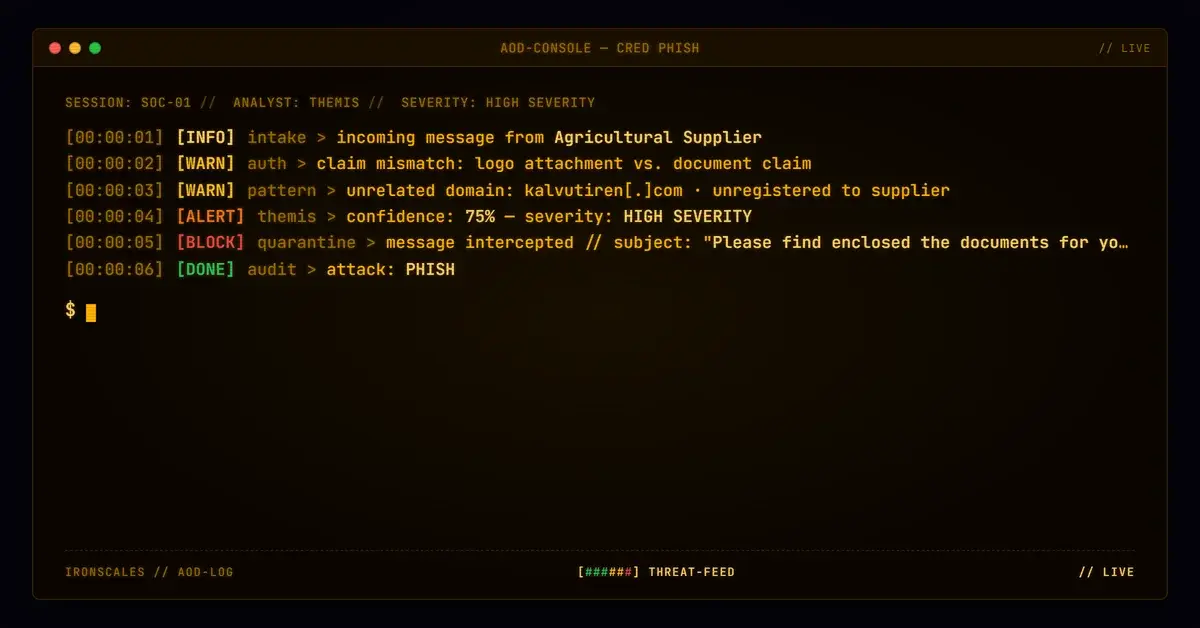
TL;DR A UK plant and tool hire company received a BCC'd note from a small agricultural services supplier it already corresponded with. The message was sent from the supplier's own Microsoft 365 mailbox, addressed to the sender himself, and claimed enclosed documents. The only attachment the platform recorded scanned Clean because it was the supplier's signature logo, matched by byte size to the inline image. The lure was a fallback sentence asking the reader to copy and paste a plain-text hostname. A depot hire desk reported it, a human analyst resolved it as malicious, and both mailboxes were quarantined.
Severity: High Vendor Email Compromise Credential Harvesting MITRE: T1566.002 MITRE: T1078 MITRE: T1534
Every artifact a control could score in this message was genuine. The sender was a real supplier with two-way history. The authentication passed. The attachment that made "enclosed documents" true scanned Clean, because it was the supplier's own signature logo.
The attack was one sentence.
The attachment slot was filled, and that was the trick
Most attachment lures fail the same test: the document is missing, or it is malicious. This one passed both. The message told a UK plant and tool hire company, "Please find enclosed the documents for your review," and the platform recorded exactly one attachment, a JPEG that scanned Clean.
That file was the supplier's signature logo. Its byte size matched the signature image embedded in the body, so the "document" was the sender's own letterhead artwork riding along as a file. (The body also carried a second, smaller inline image that was not in the attachment list, so the accurate statement is that it was the only attachment the platform recorded.)
A control that asks "is there an attachment, and is it safe?" gets two yeses. The claim of enclosed documents looks backed by evidence, and the evidence is harmless.
A correspondent, writing to himself
The sender was a small agricultural services supplier the victim already corresponded with, in both directions. The message was submitted through the supplier's own Exchange Online server, so it was sent from inside the genuine mailbox, not spoofed.
The addressing was the odd part. The To line held the sender's own address. The victim's mailboxes were on BCC. That pattern is ordinary for a bulk send and unremarkable to most filters, and it kept the victim's recipients invisible to each other.
Authentication agreed with the story. At origin the message passed SPF, DKIM and DMARC for the supplier's domain. This is the supporting detail from vendor email compromise cases we have covered before: a trusted vendor's real account can vouch for an attack. The difference here is what it vouched for. Nothing in the message was forged. The mailbox was simply no longer under the supplier's control.
The payload was a retype-me fallback
Then came the fallback sentence: "If you are having trouble opening the attachment, you can alternatively copy and paste link to view it in your web browser."
Below it sat a hostname, coloured like a link but with no anchor and no href. The incident's links array was empty, and so were the QR and OCR fields. A gateway had nothing to rewrite and nothing to detonate. The hostname's first label carried the supplier's name plus "docx" and digits, a label designed to look like a document share, on an apex domain with no connection to the supplier.
What the destination served is not in the record, so the honest description is an attacker-controlled destination. The domain was privacy-registered and Cloudflare-fronted. It was registered in January 2026, well before the September 30 send, so freshness was not the signal here.
The pairing is the point. The logo attachment made the claim credible. The fallback sentence moved the dangerous step to the reader's keyboard, outside every control that inspects message content. This maps to phishing via a link (T1566.002), delivered through valid accounts (T1078) and aimed at the supplier's customers (T1534, reuse of a trusted channel against the supplier's customers).
See Your Risk: Calculate how many threats your SEG is missing
What the gateway saw, and why it was not wrong
The recipient's inbound gateway recorded a low spam score and no impersonation flags on either policy. Microsoft's filtering assigned a trusted-sender score. By every signal those systems measure, the message was fine.
The final-hop headers looked worse. DKIM failed on body hash, SPF returned a permanent error, and DMARC failed at the last hop. Read carefully, that is the inbound gateway touching the message in transit. The original DKIM body hash matched the first hop and differed once the gateway had processed it. That is a modification artifact, not tampering by the attacker, and it is a good reason not to treat a last-hop failure as a verdict in either direction.
| Type | Indicator | Context |
|---|
| Domain | kalvutiren[.]com | Attacker-controlled apex, privacy-registered, Cloudflare name servers |
| Host | [suppliername]docx69401.kalvutiren[.]com | Plain-text, non-hyperlinked copy-and-paste host; label embeds the supplier's name |
| Attachment | JPEG, 27,804 bytes | The supplier's genuine signature logo, scanned Clean. Not malicious, listed for context only |
What caught it
Not a score. A user on the depot hire desk read a note about enclosed documents that pointed at a hostname on an unrelated domain, and reported it as an impersonation attempt. A human analyst resolved the incident as malicious, and both mailboxes that received it were quarantined.
That is the pattern in the 2026 Verizon Data Breach Investigations Report: 62% of breaches involve the human element, and 16% use phishing as the initial access vector. Phishing that is built to pass machines depends on people to catch it, and people catch it by noticing that the story does not add up.
The defensive takeaway
Stop asking only whether the artifacts are safe. Ask whether the claim and the artifacts describe the same message.
- Treat "enclosed" or "attached" language as a claim to check against the attachment's actual role. A logo-sized image that matches a signature is not a document.
- Flag To-self messages with external recipients on BCC from correspondents, even with a clean history. The FBI IC3 2024 report and CISA's phishing guidance are useful baselines for what a trusted-sender lure costs and how to report it.
- Read body text for hostnames a reader is asked to retype, hyperlinked or not. A link-only parser will report an empty array and an empty verdict.
- Run a layer that scores behavior and relationship drift on top of the gateway. A SEG augmentation approach with Adaptive AI evaluates the sender's pattern and the message's story together, informed by IRONSCALES platform data from 36,000+ security professionals across 18,000+ organizations.
The Microsoft Digital Defense Report 2024 and NIST's definition of phishing both frame the problem as deception of a person. This case shows the narrowest version: a genuine logo, a genuine mailbox, and one sentence that needed a human to retype it.
Email Attack of the Day is a daily series from
IRONSCALES spotlighting real phishing attacks caught by Adaptive AI and our community of 35,000+ security professionals. Each post breaks down a real attack. What it looked like, why it worked, and what to do about it.







/Blue%20Feature%20Flower%20Icons/gear%20head%20icon.svg)
/Misc%20Icons/icon-nav-credential-theft.svg)










/Leadership%20Headshots/Audian%20Paxson%20Headshot%201000x1000%20032026.webp?width=100&height=100&name=Audian%20Paxson%20Headshot%201000x1000%20032026.webp)



.png?width=50&height=50&name=Untitled%20-%20July%2030%2c%202026%20at%2014.53.38%20(3).png)



/Misc%20Icons/icon-red-teaming-agent-gradient-simple.svg)
/Misc%20Icons/icon-phishing-soc-agent-gradient-simple.webp?width=158&height=167&name=icon-phishing-soc-agent-gradient-simple.webp)
/Misc%20Icons/icon-phishing-simulation-agent-gradient-simple.svg)


/Misc%20Icons/icon-nav-encryption.svg)