TL;DR An attacker abuses SharePoint Online sharing notifications to deliver a phishing email that passes the complete authentication chain: SPF, DKIM, DMARC, and ARC. The message uses Microsoft's own notification template and links to a legitimate tenant-hosted SharePoint file. The upstream origin IP (145.191.82[.]95) carries a HELO of canadacentral0.notifyp.svc.ms but has no PTR record, a red flag buried beneath layers of valid Microsoft signatures.
Severity: High Credential-Harvesting Platform-Abuse MITRE: T1566.002 MITRE: T1199
When a SharePoint notification email passes SPF, DKIM, DMARC, and ARC, most email security stacks give it a green light. The authentication chain is complete. Microsoft signed it. Microsoft relayed it. The links point to Microsoft-hosted infrastructure. Everything checks out, except that the file being shared may exist specifically to steal credentials, and the entire notification is a weaponized abuse of platform trust.
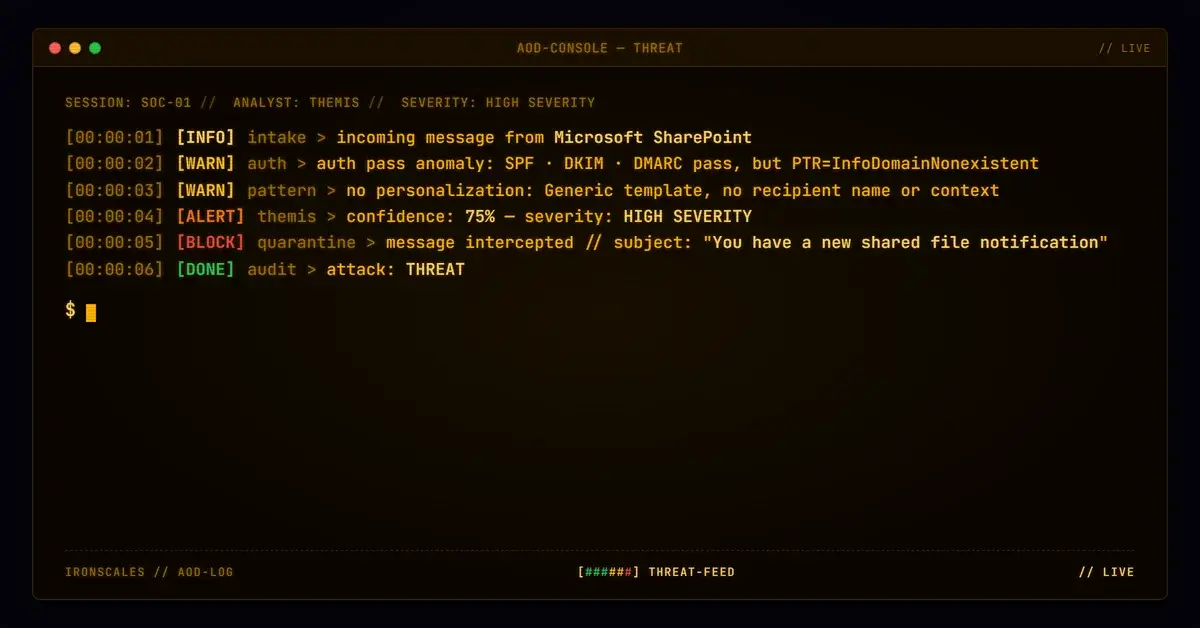
This email arrived as a standard "file shared with you" notification from SharePoint Online. The template was pixel-perfect Microsoft: branded header, privacy footer, standard layout. The recipient's own mail system flagged it with an "External Email" warning banner, which was the only visible signal that something might be off. The notification contained no recipient personalization, no first name, no last name, just the generic sharing template that Microsoft generates for any external share.
The authentication results were clean across the board: SPF passed, DKIM signatures from both sponaeop.onmicrosoft[.]com and sharepointonline[.]com verified, DMARC passed, and ARC seals were intact.
The Infrastructure Anomaly
Buried in the relay chain, one detail stood out. The upstream origin IP, 145.191.82[.]95, presented a HELO of canadacentral0.notifyp.svc.ms, but the X-Forefront-Antispam-Report flagged it with PTR=InfoDomainNonexistent. That means the IP had no valid reverse DNS record.
For Microsoft's own notification services, a missing PTR is anomalous. Legitimate Microsoft-managed notification infrastructure typically resolves cleanly. The InfoDomainNonexistent marker suggests this notification may have originated from an external orchestration service, a compromised automation account, or a notification endpoint that does not carry the same DNS hygiene as Microsoft's core mail infrastructure.
The message traversed multiple prod.outlook.com hops and protection.outlook.com nodes before delivery, collecting valid authentication stamps at each point. By the time it reached the recipient's inbox, the upstream PTR anomaly was buried under layers of legitimate Microsoft processing.
The Shared File
The links in the notification pointed to sensient-my.sharepoint[.]com, a tenant-specific SharePoint Online URL. DNS resolution confirmed the host resolved to Microsoft-owned IP addresses (13.107.136[.]10, 13.107.138[.]10), which is expected for SharePoint Online tenants. Automated URL analysis marked the links as clean.
This is the core challenge with tenant-based phishing: the links are technically clean because they point to legitimate Microsoft infrastructure. The malicious content lives inside the shared file or on the page that opens after authentication, both of which sit behind Microsoft's own access controls. URL scanning cannot evaluate content that requires authentication to view.
The shared file was an Excel workbook hosted in a personal OneDrive within the tenant. Whether the tenant account was compromised or created specifically for this campaign, the effect is the same: the attacker used Microsoft's own sharing mechanism to generate a legitimate notification that carried full authentication validity.
See Your Risk: Calculate how many threats your SEG is missing
MITRE ATT&CK
How Adaptive AI Detects This
Authentication-pass phishing is the fastest-growing blind spot for traditional gateways. When every cryptographic check succeeds, detection must shift to behavioral and contextual signals. The Adaptive AI on the IRONSCALES platform evaluates whether the sharing tenant has prior communication history with the recipient, whether the notification lacks expected personalization, and whether the upstream relay chain contains anomalies like missing PTR records. Community intelligence correlates tenant abuse patterns across organizations, identifying compromised or malicious tenants before they reach scale. Research shows that 67.5 phishing emails per 100 mailboxes per month bypass traditional secure email gateways.
Hardening Recommendations
- Do not trust SharePoint notifications by default. Verify external file shares through the SharePoint/OneDrive "Shared with me" portal, not through email links.
- Flag external tenant shares from unknown organizations. If your organization has no relationship with the sharing tenant, the notification warrants review.
- Monitor for InfoDomainNonexistent in antispam headers. This PTR anomaly is a useful secondary signal when authentication otherwise passes.
- Audit external sharing policies in your own tenant. Restrict external sharing to approved domains to reduce your attack surface as both a target and a potential unwitting relay.
- Require MFA for all SharePoint file access. If an employee clicks a malicious share link, MFA provides a second barrier before credential theft completes.
Indicators of Compromise
| Indicator | Type | Context |
|---|
145.191.82[.]95 | IP | Upstream origin, no PTR |
canadacentral0.notifyp.svc.ms | Hostname | HELO string, InfoDomainNonexistent |
sensient-my.sharepoint[.]com | Domain | Tenant-hosted share target |
sponaeop.onmicrosoft[.]com | Domain | DKIM signing domain |
sharepointonline[.]com | Domain | DKIM signing domain |
13.107.136[.]10 | IP | SharePoint resolution |
13.107.138[.]10 | IP | SharePoint resolution |
Email Attack of the Day is a daily series from
IRONSCALES spotlighting real phishing attacks caught by Adaptive AI and our community of 35,000+ security professionals. Each post breaks down a real attack. What it looked like, why it worked, and what to do about it.



/case_study_thumb_telit.webp?width=1136&height=639&name=case_study_thumb_telit.webp)











/Leadership%20Headshots/Audian%20Paxson%20Headshot%201000x1000%20032026.webp?width=100&height=100&name=Audian%20Paxson%20Headshot%201000x1000%20032026.webp)



.png?width=50&height=50&name=Untitled%20-%20July%2030%2c%202026%20at%2014.53.38%20(3).png)



/Misc%20Icons/icon-red-teaming-agent-gradient-simple.svg)
/Misc%20Icons/icon-phishing-soc-agent-gradient-simple.webp?width=158&height=167&name=icon-phishing-soc-agent-gradient-simple.webp)
/Misc%20Icons/icon-phishing-simulation-agent-gradient-simple.svg)


/Misc%20Icons/icon-nav-encryption.svg)