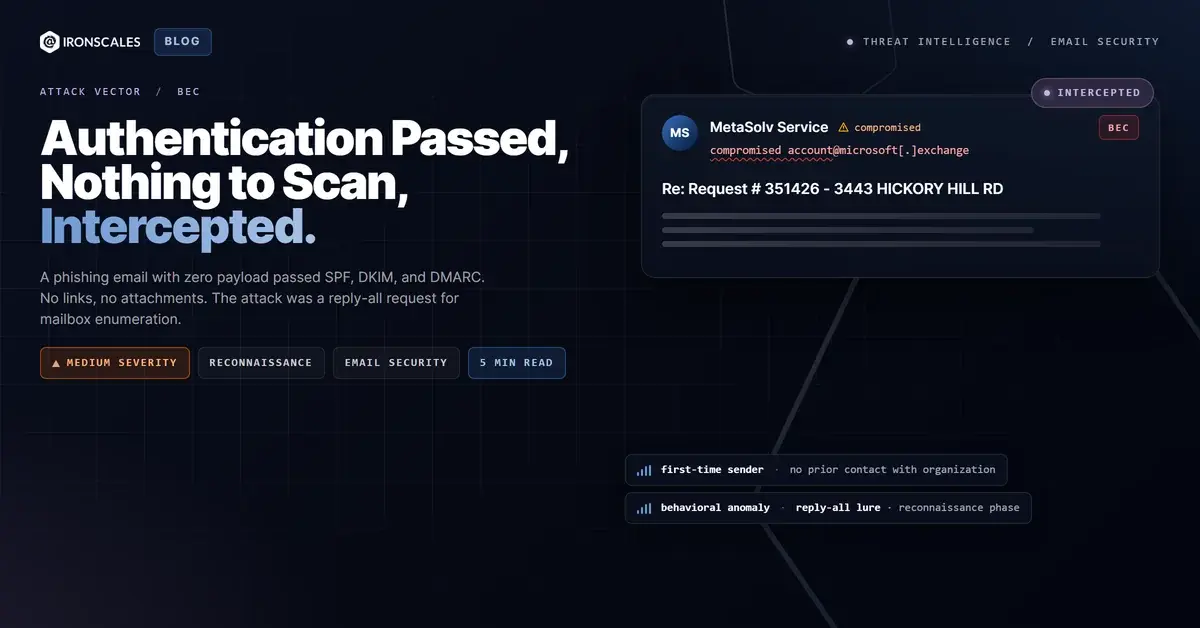
TL;DR An email from a legitimate telecom domain passed SPF, DKIM, and DMARC authentication with no links, attachments, or malicious payload. The message impersonated an operational service order and asked recipients to reply all to confirm receipt. This is mailbox enumeration, a reconnaissance technique that confirms live targets for follow-up BEC or vendor email compromise. IRONSCALES Adaptive AI flagged the behavioral anomaly (first-time sender, high risk score, reply-all solicitation) and quarantined four mailboxes within seconds.
Severity: Medium Bec Reconnaissance MITRE: T1589 MITRE: T1586 MITRE: T1566
No malicious link. No attachment. No embedded payload of any kind. SPF passed. DKIM passed. DMARC passed. Microsoft's own anti-spam filters scored it clean. The email landed in inboxes at a broadband infrastructure company, dressed as a routine telecom service order, and asked one thing: reply all to confirm receipt.
That was the entire attack.
There was nothing to scan because there was nothing malicious in the email itself. The weapon was the reply button. If any recipient followed the instruction, they would confirm a live, monitored mailbox to an unknown sender, hand over their email signature and internal contact details, and open a trusted reply thread the attacker could exploit for weeks.
The Service Order That Looked Exactly Right
The email arrived on a Friday afternoon, formatted as a telecom drop request (a fiber or copper line installation order). It referenced a specific street address, a MetaSolv ticket number, a cost center code, an exchange name, and a construction due date. The language was fluent operational jargon. Recipients included a mix of internal employees and external contractors across multiple domains, plus a Gmail address.
The subject line followed a recognizable pattern: Re: Request # 351426 - 3443 HICKORY HILL RD. The Re: prefix suggested this was a reply in an existing thread, not a cold outbound message. That detail matters. People treat replies differently than new messages. A reply implies prior context, prior trust.
The body closed with a single instruction: "Please reply all to this email to accept and confirm receipt of this drop request."
No urgency. No threat. No link to click. Just a polite, professional-sounding request that, if followed, would complete the reconnaissance.
Why Authentication Told the Wrong Story
Every email authentication check returned green. The SPF record confirmed the sending IP (2a01:111:f403:c107::1) was authorized to send on behalf of the sender's domain. DKIM signatures verified the message body had not been tampered with in transit. DMARC alignment passed with a policy of p=none (monitor only, no enforcement).
This is the core problem with authentication-only security models. SPF, DKIM, and DMARC answer one question: "Was this email sent from infrastructure authorized by the domain owner?" They do not answer: "Does the person controlling this account have legitimate intent?"
When an attacker compromises a real account (or registers one through a legitimate provider's abuse-prone onboarding), all three protocols validate perfectly. The Microsoft Digital Defense Report 2024 documented this pattern extensively, noting that threat actors increasingly use authenticated infrastructure to bypass gateway-level controls. According to the Verizon 2024 DBIR, the human element is involved in 68% of breaches, and social engineering remains the top attack pattern, with phishing as the dominant vector.
The sending account routed through Microsoft Exchange Online Protection and multiple Microsoft SMTP relays. ARC (Authenticated Received Chain) seals were intact. Every relay hop was legitimate Microsoft infrastructure. To any content-scanning gateway, this was a clean, authenticated message from a real organization's real email tenant.
Mailbox Enumeration as a Pre-Attack Phase
This is not a standalone attack. It is Phase 1 of a multi-stage campaign mapped to MITRE ATT&CK T1589 (Gather Victim Identity Information). The reply-all mechanic serves three purposes:
- Target validation. Every reply confirms an active, monitored mailbox. Bounces and out-of-office autoreplies also leak information (the bounce confirms the address exists but is unmonitored; the autoreply often includes a backup contact, return date, and phone number).
- Signature harvesting. Corporate email signatures typically contain full names, titles, direct phone numbers, department names, and sometimes physical addresses. That metadata feeds the next phase: targeted BEC or vendor impersonation.
- Thread establishment. Once a victim replies, the attacker has a legitimate reply thread with proper headers, threading metadata, and conversational context. Future messages in that thread inherit trust. Recipients are far less likely to scrutinize the fifth message in a thread than the first.
The FBI IC3 2024 Internet Crime Report recorded over $2.9 billion in BEC losses. Many of those campaigns started with exactly this kind of low-friction reconnaissance: a harmless-looking email designed to build a target list before the real payload arrives.
The MITRE framework also maps this to T1586 (Compromise Accounts), reflecting the likelihood that the sending account was compromised rather than legitimately operated.
The Signals That Content Scanners Missed
No content scanner could have caught this. There was no URL to detonate in a sandbox. No attachment to hash-check. No embedded form, no JavaScript, no redirect chain. The body was plain operational text that would pass any natural language analysis for phishing intent.
What did catch it was behavioral analysis. IRONSCALES Adaptive AI flagged the message based on a combination of signals that no individual check would have surfaced alone:
- First-time sender. This account had never contacted this organization before. For a message claiming to be part of an existing operational workflow, that is a significant anomaly.
- Sender risk scoring. Cross-organizational intelligence from over 36,000 security professionals in the IRONSCALES community elevated the sender's risk score, indicating this account or pattern had been flagged elsewhere.
- Reply-all solicitation to mixed recipients. The recipient list included internal addresses, external contractor addresses, and a Gmail account. Legitimate service orders rarely mix personal Gmail addresses with corporate distribution lists.
Within seconds of delivery, four mailboxes were quarantined. The message was reverted before any recipient could act on the reply-all instruction.
See Your Risk: Calculate how many threats your gateway is missing
What This Means for Authentication-Dependent Security
CISA's phishing guidance recommends email authentication as a foundational control. It is. But this case demonstrates that authentication is a floor, not a ceiling. When the attack carries no payload and the sending account is legitimately authenticated, the entire content-inspection layer of your security stack becomes irrelevant.
The defenses that matter here are behavioral:
- First-time sender flagging with context-aware escalation. Not just a banner ("This is the first time you've received email from this sender") but automated risk scoring that correlates first-contact status with other anomaly signals.
- Reply-all pattern analysis. Messages that solicit reply-all responses to mixed internal and external recipient lists should trigger additional scrutiny, particularly when the sender is unrecognized.
- Cross-organizational threat intelligence. A single organization may not have enough data points to flag this sender. A community of 36,000+ security professionals sharing real-time threat signals can identify compromised accounts before they reach your mailbox.
Zero-payload attacks are not new. But they are getting better. The operational specificity in this email (ticket numbers, exchange codes, construction dates) suggests the attacker had access to real operational data, either through a prior breach or through the compromised account's own mailbox history. The days of "just don't click the link" are long past. Sometimes there is no link to click.
Indicators of Compromise
| Type | Indicator | Context |
|---|
| Sender Email | Conner.DiPersio@tdstelecom[.]com | Likely compromised or abuse-registered account |
| Sender Domain | tdstelecom[.]com | Legitimate telecom domain (authenticated via SPF/DKIM/DMARC) |
| Sending IP | 2a01:111:f403:c107::1 | Microsoft Exchange Online Protection (outbound relay) |
| Reply-To Thread | Re: Request # 351426 | Thread-hijack prefix to imply existing conversation |
| Report ID | 44b1cdbf2e51b61f5b1a86e7dddde0a0 | IRONSCALES incident reference |
Email Attack of the Day is a daily series from
IRONSCALES spotlighting real phishing attacks caught by Adaptive AI and our community of 36,000+ security professionals. Each post breaks down a real attack. What it looked like, why it worked, and what to do about it.







/Blue%20Feature%20Flower%20Icons/gear%20head%20icon.svg)
/Misc%20Icons/icon-nav-credential-theft.svg)










/Leadership%20Headshots/Audian%20Paxson%20Headshot%201000x1000%20032026.webp?width=100&height=100&name=Audian%20Paxson%20Headshot%201000x1000%20032026.webp)



.png?width=50&height=50&name=Untitled%20-%20July%2030%2c%202026%20at%2014.53.38%20(3).png)



/Misc%20Icons/icon-red-teaming-agent-gradient-simple.svg)
/Misc%20Icons/icon-phishing-soc-agent-gradient-simple.webp?width=158&height=167&name=icon-phishing-soc-agent-gradient-simple.webp)
/Misc%20Icons/icon-phishing-simulation-agent-gradient-simple.svg)


/Misc%20Icons/icon-nav-encryption.svg)