TL;DR Attackers inserted malicious URLs into an otherwise professional B2B thread requesting certificates of insurance, audit reports, and product specifications. The links were rewritten through url.emailprotection.link, a domain that mimics the naming convention of legitimate email security gateways but appears in malware and blacklist databases. The professional content of the thread provided cover for the malicious redirects. Themis flagged the links before the recipient clicked.
Severity: High Malicious Redirect Social Engineering B2B Thread Hijacking MITRE: {'id': 'T1566.002', 'name': 'Phishing: Spearphishing Link'} MITRE: {'id': 'T1036', 'name': 'Masquerading'} MITRE: {'id': 'T1071.003', 'name': 'Application Layer Protocol: Mail Protocols'}
The email read like a routine vendor compliance request. The sender was from a specialty ingredients company. The message asked for a certificate of insurance, SQF third-party audit documentation, product specifications for two product lines, a kosher certificate, and a signed NDA. The terminology was industry-appropriate. The request was the kind that supply chain procurement teams handle weekly.
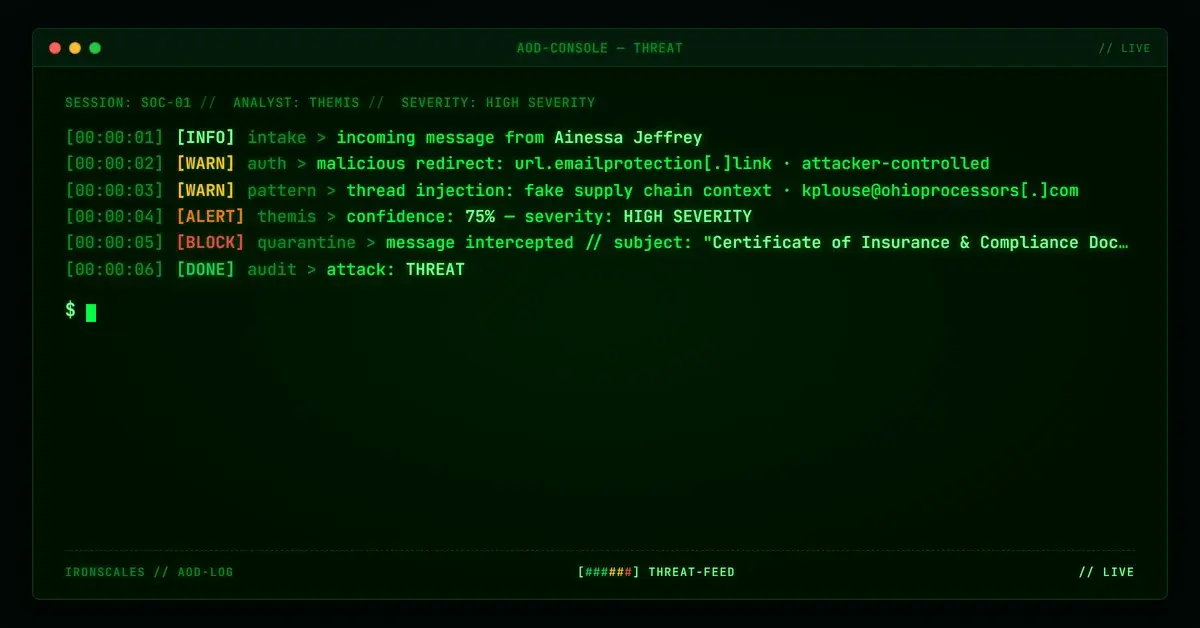
Every link in the email went through url.emailprotection[.]link. That domain is not a legitimate email security gateway. It is not owned by any recognized security vendor. It appears in malware analysis reports and threat intelligence blacklists as attacker-controlled redirect infrastructure.
Every URL that passed through it in this message was flagged malicious.
When the Thread Looks Right and the Links Are Wrong
The sender address, ainessa.jeffrey@a-specialty-ingredients-company[.]example, traced to a legitimate specialty ingredients company domain. The domain had a standard registration profile: registered in 2020 through Network Solutions with ZoneEdit nameservers. Nothing in the domain's history or DNS configuration suggested compromise or abuse at first inspection.
The body of the email made the attack harder to spot. It referenced specific product names (Stabilac 12 and 15) by their proper designations. It used compliance terminology correctly. It requested documents by their actual industry names. An employee in a procurement or quality assurance role receiving this message would recognize the request as a normal part of doing business with an ingredient supplier.
This is the operational value of threading attacks through legitimate-looking B2B content. Credential harvesting operations and malicious redirect campaigns that are wrapped in plausible business context require the recipient to make a judgment call about both the email and the links. The email looks right. The ask looks right. The only thing that does not look right is the link infrastructure, and most recipients never check that.
The emailprotection.link Misdirection
url.emailprotection[.]link is designed to look like a legitimate security gateway URL-rewriting service. The naming convention, with "emailprotection" as the core term, echoes the domains used by real gateways to wrap links for click-time scanning (Proofpoint uses urldefense.proofpoint.com, Microsoft uses safelinks.protection.outlook.com, Mimecast uses url.au.m.mimecast.com and similar patterns). Someone unfamiliar with which gateway their organization uses might not question why their links are being rewritten.
The key verification step is WHOIS ownership. Legitimate security gateway URL-rewriting domains are owned by the security vendor. url.emailprotection[.]link is not owned by any recognized security company. Its appearance in malware and blacklist feeds confirms that it has been observed routing traffic to malicious destinations.
Three specific element IDs were flagged in this case: 619884515, 619884517, and 619884518. These are internal references to the link objects in the email as parsed by the detection system. Each corresponded to a URL passing through url.emailprotection[.]link and each was classified as malicious.
The legitimate links in the same email, pointing to a-specialty-ingredients-company[.]example and to LinkedIn profiles, were clean. This mixed-link pattern is common in sophisticated phishing campaigns: include real links to reduce the overall suspicion score of the message while embedding the malicious redirects among them.
The Supply Chain Context
The thread also included a reference to kplouse@ohioprocessors[.]com, a food processing company, as a sender within the thread. This detail adds a second layer of apparent legitimacy: the message appeared to be part of an ongoing conversation between two real companies rather than a cold outbound phishing attempt. Whether this was a fabricated thread reference or an indication of a compromised account upstream in the chain was not confirmed in the available case data, but the technique is consistent with thread injection tactics documented in spear-phishing campaigns targeting supply chains.
The FBI's 2024 Internet Crime Complaint Center report documented continued growth in supply chain and vendor fraud, with Business Email Compromise and related attacks consistently ranking among the highest-cost categories. B2B thread injection campaigns are a specific subset of this threat, exploiting the high-trust, low-scrutiny context of established vendor relationships.
See Your Risk: Calculate how many threats your SEG is missing
Detection Without URL Detonation
Themis, the IRONSCALES Adaptive AI engine, flagged the malicious links and replaced them in the delivered message before the recipient had any opportunity to click. The IRONSCALES banner visible in the email stated explicitly: "IRONSCALES found a malicious link in this email. The link has been replaced."
This is the protection model that matters for link-based threats in otherwise clean email content. The business context of the message is not evidence of safety. The authentication status of the sending domain is not evidence of safety. The sender's name appearing in what looks like an ongoing thread is not evidence of safety. The link infrastructure is the threat surface, and evaluating that infrastructure requires more than a HEAD request to verify a URL resolves.
Reputation data on the routing domain (url.emailprotection[.]link), cross-organization intelligence from prior observations of that infrastructure in other attacks, and behavioral signals from the thread structure all contributed to the detection. The email arrived with no technical authentication failures that would have stopped it at the perimeter. It was the link analysis that made the difference.
Indicators of Compromise
| Type | Indicator | Context |
|---|
| Malicious Redirect Domain | url.emailprotection[.]link | Attacker-controlled URL rewriter; mimics legitimate security gateway naming |
| Malicious Link Element IDs | 619884515, 619884517, 619884518 | Specific link objects in the email flagged malicious |
| Sender Address | ainessa.jeffrey@a-specialty-ingredients-company[.]example | Specialty ingredients company sender; legitimate domain but suspicious message |
| Thread Reference Address | kplouse@ohioprocessors[.]com | Food processing company contact referenced in thread; possible thread injection |
| Sender Domain | a-specialty-ingredients-company[.]example | Registered 2020 via Network Solutions; ZoneEdit NS; no auth failures |
MITRE ATT&CK Mapping
| Technique | ID | Relevance |
|---|
| Phishing: Spearphishing Link | T1566.002 | Malicious redirect links embedded in B2B vendor email |
| Masquerading | T1036 | Redirect domain named to resemble legitimate security gateway infrastructure |
| Application Layer Protocol: Mail Protocols | T1071.003 | Email used as delivery channel for redirect-based payload |
Email Attack of the Day is a daily series from
IRONSCALES spotlighting real phishing attacks caught by Adaptive AI and our community of 36,000+ security professionals. Each post breaks down a real attack. What it looked like, why it worked, and what to do about it.



/case_study_thumb_telit.webp?width=1136&height=639&name=case_study_thumb_telit.webp)



/Blue%20Feature%20Flower%20Icons/gear%20head%20icon.svg)
/Misc%20Icons/icon-nav-credential-theft.svg)










/Leadership%20Headshots/Audian%20Paxson%20Headshot%201000x1000%20032026.webp?width=100&height=100&name=Audian%20Paxson%20Headshot%201000x1000%20032026.webp)



.png?width=50&height=50&name=Untitled%20-%20July%2030%2c%202026%20at%2014.53.38%20(3).png)



/Misc%20Icons/icon-red-teaming-agent-gradient-simple.svg)
/Misc%20Icons/icon-phishing-soc-agent-gradient-simple.webp?width=158&height=167&name=icon-phishing-soc-agent-gradient-simple.webp)
/Misc%20Icons/icon-phishing-simulation-agent-gradient-simple.svg)


/Misc%20Icons/icon-nav-encryption.svg)