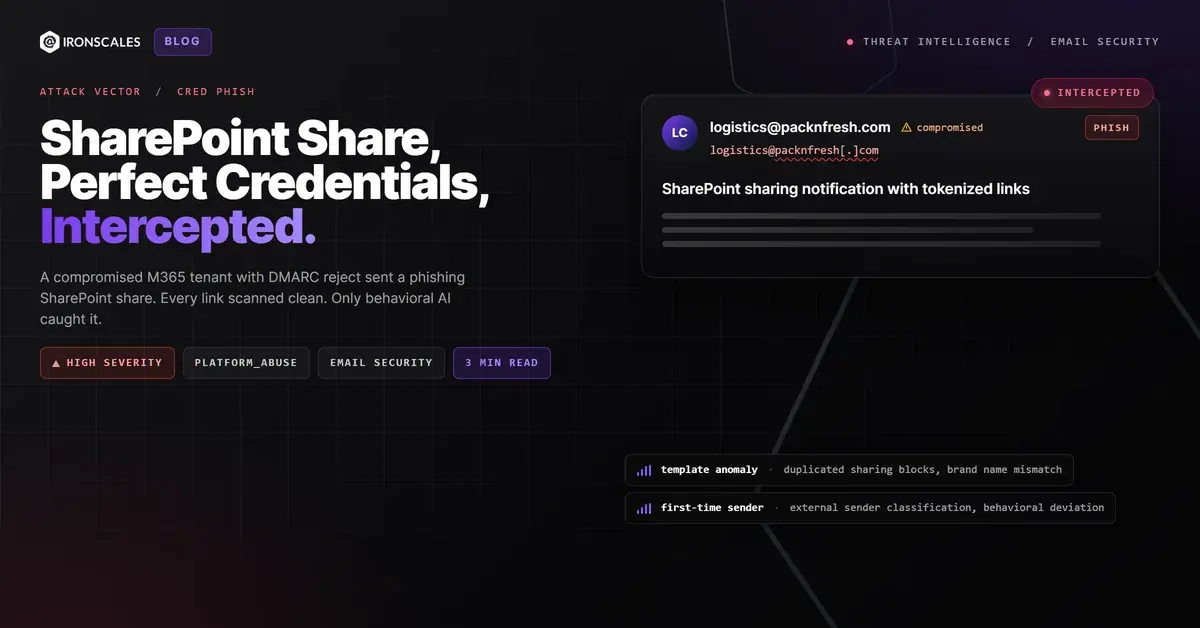
TL;DR A phishing email arrived as a standard Microsoft SharePoint file-sharing notification from a compromised M365 tenant. The sending domain had been registered since 2017, ran Microsoft 365 mail infrastructure with DMARC policy set to reject at 100% enforcement, and passed SPF, DKIM, and DMARC on delivery. Every link in the message pointed to SharePoint infrastructure hosted on Microsoft servers and scanned clean. The file-sharing URLs contained long tokenized query parameters (xsdata, sdata) typical of both legitimate shares and attacker-crafted credential harvesting links. Formatting inconsistencies in the message body, duplicated sharing blocks, and the external sender warning were the only visible anomalies. Themis flagged the message on behavioral signals. The mailbox was quarantined automatically.
Severity: High Credential Harvesting Platform Abuse MITRE: {'id': 'T1566.002', 'name': 'Phishing: Spearphishing Link'} MITRE: {'id': 'T1586.002', 'name': 'Compromise Accounts: Email Accounts'} MITRE: {'id': 'T1204.001', 'name': 'User Execution: Malicious Link'}
The email looked like every other SharePoint file share: a blue "Open" button, a filename, and a sender address from a domain registered nine years ago. SPF passed. DKIM passed. DMARC passed with a policy of p=reject at 100% enforcement. Every link resolved to Microsoft-hosted SharePoint infrastructure and scanned clean.
This was not a spoofed email bypassing authentication. This was a legitimate tenant sending from inside the trust boundary.
A Compromised Tenant With Perfect Credentials
The sending domain packnfresh[.]com was registered in 2017. Its MX records pointed to Microsoft 365 protection infrastructure. SPF authorized spf.protection.outlook.com. DKIM selectors were configured and signing correctly. DMARC was set to p=reject; pct=100, the strictest enforcement level available. The domain's DNS posture was cleaner than most Fortune 500 companies.
The message was sent from logistics@packnfresh[.]com through outbound.protection.outlook[.]com, the standard Microsoft outbound relay. ARC seals at both hops validated correctly. From the perspective of every authentication protocol, this was a trusted sender operating within properly configured infrastructure.
That is exactly the problem with compromised-account attacks. The attacker does not need to build infrastructure, register domains, or configure DNS records. They inherit everything from the account they take over.
Links That Went to the Right Place
The SharePoint sharing links pointed to packnfresh-my.sharepoint[.]com with long, tokenized query parameters containing xsdata and sdata values. These CNAME to Microsoft-hosted SharePoint endpoints. URL scanners checked the domain reputation (Microsoft), the certificate (valid), and the HTTP response (200 OK) and returned "clean."
The tokens themselves are opaque strings that grant access to whatever the attacker shared. It could be a legitimate-looking PDF that prompts for Microsoft credentials before opening. It could be a document containing a secondary phishing link. The scanning system evaluated the link destination. It did not, and could not, evaluate what happened after the recipient clicked "Open" and authenticated.
The Template Inconsistencies
Two details separated this from a legitimate share. The message body contained duplicated sharing blocks, a rendering artifact that suggests the notification was generated or modified outside the standard SharePoint sharing flow. And the company name appeared in two formats ("PacknFresh" and "Pack'n Fresh") across the notification template, an inconsistency that a native SharePoint share would not produce.
Themis, the IRONSCALES Adaptive AI engine, flagged the message on the combination of first-time sender behavior, the external sender classification by the recipient's tenant, and the formatting anomalies in the sharing notification. The mailbox was quarantined before the link was clicked.
See Your Risk: Calculate how many threats your SEG is missing
Indicators of Compromise
| Type | Indicator | Context |
|---|
| Sending Domain | packnfresh[.]com | Compromised M365 tenant, registered 2017, DMARC p=reject |
| Sender Address | logistics@packnfresh[.]com | Full SPF/DKIM/DMARC pass |
| Sending Relay | outbound.protection.outlook[.]com | Standard Microsoft 365 outbound infrastructure |
| SharePoint Links | packnfresh-my.sharepoint[.]com | Tokenized sharing URLs with xsdata/sdata parameters |
| Link Verdict | Clean | All links resolve to Microsoft SharePoint endpoints |
| Template Anomaly | Duplicated sharing blocks | Rendering inconsistency, not typical of native SharePoint shares |
| Naming Inconsistency | "PacknFresh" vs "Pack'n Fresh" | Brand name mismatch across notification template |
MITRE ATT&CK Mapping
| Technique | ID | Relevance |
|---|
| Phishing: Spearphishing Link | T1566.002 | SharePoint sharing link as primary delivery vector |
| Compromise Accounts: Email Accounts | T1586.002 | Legitimate M365 account used to send phishing notification |
| User Execution: Malicious Link | T1204.001 | Recipient must click "Open" and authenticate to access shared content |
Email Attack of the Day is a daily series from
IRONSCALES spotlighting real phishing attacks caught by Adaptive AI and our community of 36,000+ security professionals. Each post breaks down a real attack. What it looked like, why it worked, and what to do about it.







/Blue%20Feature%20Flower%20Icons/gear%20head%20icon.svg)
/Misc%20Icons/icon-nav-credential-theft.svg)










/Leadership%20Headshots/Audian%20Paxson%20Headshot%201000x1000%20032026.webp?width=100&height=100&name=Audian%20Paxson%20Headshot%201000x1000%20032026.webp)



.png?width=50&height=50&name=Untitled%20-%20July%2030%2c%202026%20at%2014.53.38%20(3).png)



/Misc%20Icons/icon-red-teaming-agent-gradient-simple.svg)
/Misc%20Icons/icon-phishing-soc-agent-gradient-simple.webp?width=158&height=167&name=icon-phishing-soc-agent-gradient-simple.webp)
/Misc%20Icons/icon-phishing-simulation-agent-gradient-simple.svg)


/Misc%20Icons/icon-nav-encryption.svg)