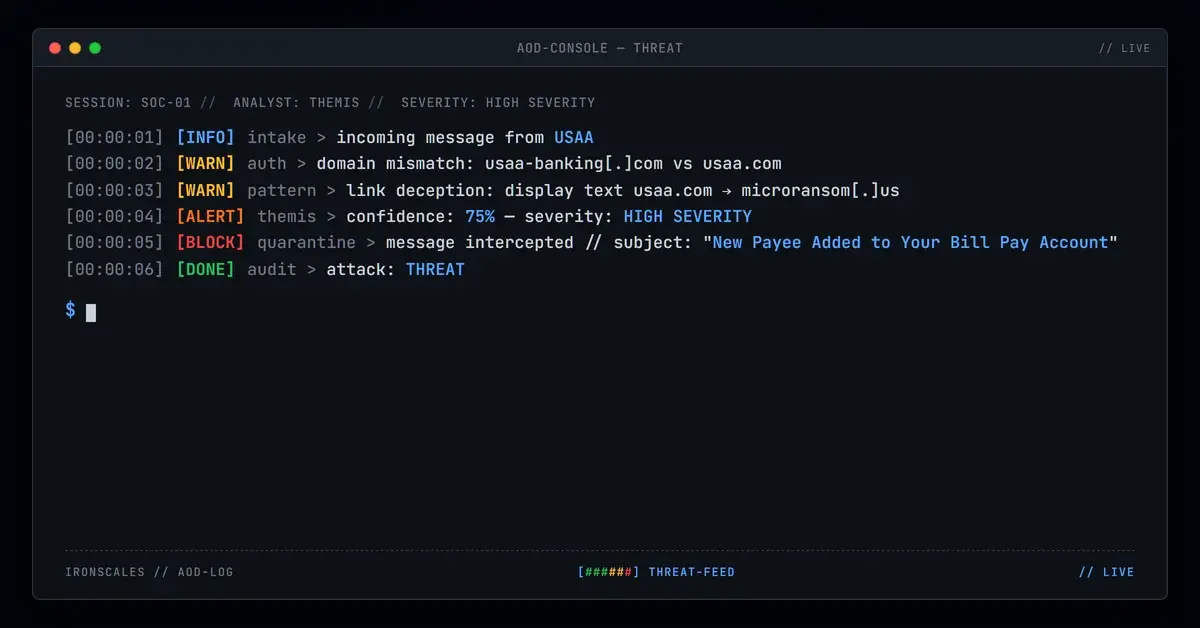
TL;DR A credential harvesting campaign impersonated USAA with a convincing 'Payee Added to Bill Pay' alert sent from the lookalike domain usaa-banking[.]com. The email targeted an energy sector employee, using fabricated payee details and deceptive links that pointed to cardpayments[.]microransom[.]us instead of usaa.com. Multiple detection signals (first-time sender, domain mismatch, deceptive hrefs) flagged the attack before credentials could be compromised.
It was a Wednesday morning. The inbox notification looked routine: a payee had been added to a USAA Bill Pay account. The email carried the familiar blue-and-white USAA branding, complete with social media icons in the footer and a "Go Paperless" section that mirrored genuine USAA communications down to the pixel. A table listed the new payee's details: name, partial account number, transaction reference. At the bottom, a single call to action urged the recipient to log into Online Banking if they hadn't authorized the change.
The problem? The recipient didn't have a USAA account. They worked at an energy company. And every link in that email pointed somewhere that had nothing to do with USAA.
Borrowed Trust, Manufactured Panic
The social engineering here is textbook financial urgency. A payee being added to your bank account without your knowledge triggers an immediate emotional response. You didn't do this, so someone else did. The instinct is to act fast, click the link, verify, secure the account. Attackers know this. They count on it.
The email addressed the recipient by their corporate email address ("Dear jsoell@a-private-company[.]example,") rather than a personalized member name. That's a tell, but one most people miss when they're alarmed about unauthorized account activity. The fabricated payee details (a name, a partial account number ending in *395) added specificity that made the alert feel real. Real alerts include real details. This one did too, just not real ones.
Every visible link displayed "usaa.com" or "Online Banking" as anchor text. But underneath, all of them resolved to long, obfuscated URLs on cardpayments[.]microransom[.]us. The destination was a credential harvesting page designed to capture banking login credentials the moment someone tried to "verify" their account.
Three Domains, One Attack
The infrastructure behind this campaign reveals a deliberate effort to avoid easy detection. The attacker operated across three distinct domains, each serving a different function.
The sender domain: usaa-banking[.]com. Not usaa.com. Registered through an identity protection proxy via Amazon Registrar, this lookalike domain exists solely to pass a quick visual check. It shares no DNS infrastructure with the actual USAA corporate domain.
The credential harvest domain: cardpayments[.]microransom[.]us. This is where all the "Online Banking" links actually pointed. WHOIS records show the domain registered to a generic "Domain Manager" entity through Gandi, using AWS nameservers. Threat intelligence platforms flagged it with a risk score of 0.82 out of 1.0, and sandbox analysis from multiple vendors confirmed active phishing behavior. The URL returned HTTP 200 with a small page payload, consistent with landing pages designed to capture credentials or redirect client-side.
The reply-to domain: net-login[.]com. The Reply-To header pointed to alerts[.]1cpyx5wa@sza[.]employeeportal[.]net-login[.]com, a completely different domain from either the sender address or the credential harvest destination. This triple-domain setup (one for display, one for data exfiltration, one for any victim replies) is a hallmark of more organized phishing operations.
The email was delivered via Gmail API (gmailapi.google.com with HTTPREST), bypassing traditional SMTP relay chains. This API-based delivery method can help attackers avoid gateway-level inspection that keys on standard relay headers.
For MITRE ATT&CK mapping: this attack aligns with T1566.002 (Spearphishing Link) for the initial delivery vector and T1598.003 (Phishing for Information via Link) for the credential harvesting objective.
What Caught It Before the Click
The email triggered multiple detection signals simultaneously. First: this was a first-time sender to the target mailbox, an immediate risk flag for any email that demands urgent action on a financial account. The sender domain usaa-banking[.]com failed to match the legitimate usaa.com domain, and the Return-Path (noreply@psm[.]knowbe4[.]com) diverged entirely from the display-from address, creating a three-way header mismatch across From, Return-Path, and Reply-To.
The href-versus-display-text deception (showing "usaa.com" while linking to microransom[.]us) is exactly the kind of signal that behavioral AI analysis catches by examining what the email does rather than just what it says. A legacy secure email gateway evaluating reputation alone might pass the sender domain (it was freshly registered, not yet on all blocklists). But the combination of first-time sender, domain mismatch, deceptive link targets, and a hidden tracking pixel (a zero-by-zero image hosted on the credential harvest domain) painted a clear picture.
The email also contained a 0x0 tracking pixel hosted on cardpayments[.]microransom[.]us, a reconnaissance mechanism that would confirm to the attacker whether the email was opened, from what IP, and at what time.
See Your Risk: Calculate how many threats your SEG is missing
Why Financial Brand Impersonation Keeps Working
Financial institution impersonation remains one of the most effective phishing vectors because it exploits a universal anxiety: someone accessing your money. The FBI IC3 2024 report documented over $12.5 billion in losses from internet crime, with phishing and credential theft ranking among the top complaint categories. The Verizon DBIR 2024 found that credentials remain the single most targeted data type in breaches, and the IBM Cost of a Data Breach 2024 report pegged phishing as the most expensive initial attack vector at $4.88 million per incident.
USAA specifically serves military members and their families, a demographic that includes many government and defense sector employees. Impersonating USAA in an email sent to an energy company employee suggests either broad-spectrum targeting (spray and hope someone has a USAA account) or deliberate cross-sector reconnaissance.
What made this particular attack effective:
- Pixel-perfect branding. The USAA logos, footer layout, social media icons, and "Go Paperless" section were indistinguishable from legitimate communications at a glance.
- Fabricated specificity. Including a named payee and partial account number made the alert feel transactional rather than generic.
- Triple-domain infrastructure. Separating the sender, credential harvest, and reply-to domains makes takedown efforts harder and reduces the chance that blocking one domain stops the campaign.
- API-based delivery. Using Gmail API instead of traditional SMTP avoided some relay-based inspection mechanisms.
- Emotional override. Unauthorized account activity bypasses rational evaluation. People click first and think second when they believe their money is at risk.
The defense? Don't evaluate emails by how they look. Evaluate them by where they actually send you. Hover before you click. Verify the sender domain against the organization's known domain (usaa.com, not usaa-banking.com). And when an email demands immediate action on a financial account, go directly to the institution's website or app instead of following any link in the message. CISA's phishing guidance reinforces this: verify independently, never through the message itself.
Email Attack of the Day is a daily series from
IRONSCALES spotlighting real phishing attacks caught by Adaptive AI and our community of 36,000+ security professionals. Each post breaks down a real attack. What it looked like, why it worked, and what to do about it.







/Blue%20Feature%20Flower%20Icons/gear%20head%20icon.svg)
/Misc%20Icons/icon-nav-credential-theft.svg)










/Leadership%20Headshots/Audian%20Paxson%20Headshot%201000x1000%20032026.webp?width=100&height=100&name=Audian%20Paxson%20Headshot%201000x1000%20032026.webp)



.png?width=50&height=50&name=Untitled%20-%20July%2030%2c%202026%20at%2014.53.38%20(3).png)



/Misc%20Icons/icon-red-teaming-agent-gradient-simple.svg)
/Misc%20Icons/icon-phishing-soc-agent-gradient-simple.webp?width=158&height=167&name=icon-phishing-soc-agent-gradient-simple.webp)
/Misc%20Icons/icon-phishing-simulation-agent-gradient-simple.svg)


/Misc%20Icons/icon-nav-encryption.svg)