


.png?width=50&height=50&name=Untitled%20-%20July%2030%2c%202026%20at%2014.53.38%20(3).png)








/Misc%20Icons/icon-red-teaming-agent-gradient-simple.svg)
/Misc%20Icons/icon-phishing-soc-agent-gradient-simple.webp?width=158&height=167&name=icon-phishing-soc-agent-gradient-simple.webp)
/Misc%20Icons/icon-phishing-simulation-agent-gradient-simple.svg)


/Misc%20Icons/icon-nav-encryption.svg)


/Blue%20Feature%20Flower%20Icons/gear%20head%20icon.svg)
/Misc%20Icons/icon-nav-credential-theft.svg)










Exchange Online Protection vs Defender For Office 365
Robust email security is a critical concern for businesses aiming to protect sensitive data from cyber-attacks. The scale is significant. Business Email Compromise (BEC) scams drove $2.77 billion in adjusted losses in 2024, according to the FBI's IC3 Report. This showcases the immense financial impact and potential erosion of trust that can result from email security breaches, emphasizing the importance of robust cybersecurity measures.
Incidents like these underscore why companies are increasingly investing in advanced cybersecurity solutions. To support this critical need, Microsoft has developed Microsoft Exchange Online Protection (EOP) and Defender for Office 365 (MDO), which are its flagship solutions for email security. EOP offers essential protection against spam and malware, making it suitable for organizations needing fundamental email security. Defender for Office 365 provides more comprehensive coverage, extending its reach with additional features. In this article, we explore the capabilities and features of EOP and MDO, their best practices, and how they compare to each other.
The table below summarizes the features covered by EOP and Defender for Office 365 and how the two products compare in each area.
| Capability | Exchange Online Protection | Defender for Office 365 |
|---|---|---|
| Threat intelligence | Basic spam and malware detection | Advanced threat intelligence and analysis |
| Behavioral analysis | Limited, rule-based analysis | Behavioral analysis based on user patterns |
| Safe Attachments | Basic attachment scanning | Sandbox detonation of attachments |
| Safe Links | URL filtering on known threats | Real-time URL scanning and AI-based analysis |
| Identity protection | Standard identity protection | Enhanced protection integrated with Microsoft 365 security |
| Integration with Microsoft 365 | Basic integration with the suite | Deep, cohesive integration across Microsoft 365 apps |
| Reporting and analytics | Standard reporting tools | Advanced analytics and detailed threat reports |
As of July 1, 2026: Defender for Office 365 Plan 1 (Safe Links, Safe Attachments, and advanced anti-phishing) is now included in Microsoft 365 E3 and Office 365 E3, and the rollout completes by August 1, 2026. The older "buy up to get email threat protection" framing no longer applies to E3. Plan 2 (Automated Investigation and Response, Threat Explorer at depth, Attack Simulation Training, and advanced hunting) stays in E5. Verified against Microsoft's Defender for Office 365 feature-by-plan documentation.
Understanding Exchange Online Protection (EOP)
EOP is a cloud-based filtering service that protects organizations against email threats, including malware, spam, and malicious links. Each incoming email goes through a series of checks, including sender IP address, malware scanning, policy filtering, and spam detection. Additionally, EOP also includes advanced analytics and detailed threat reports.
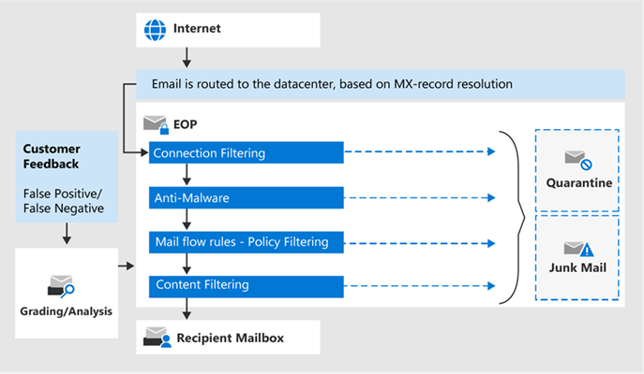 EOP workflow (source)
Understanding Defender for Office 365
Microsoft renamed Office 365 Advanced Threat Protection to Microsoft Defender for Office 365 (MDO) in September 2020. MDO manages email security and incident response as part of the broader Microsoft Defender XDR family. In MDO, incoming emails go through four phases before reaching the recipient’s mailbox:
- Phase 1, Edge Protection: This phase involves protection against different threats, including DOS attacks. Key features include networking throttling, IP reputation and throttling, domain reputation, directory-based edge filtering, backscatter detection, and enhanced filtering for connectors.

First phase of Defender for Office 365 protection (source)
- Phase 2, Sender Intelligence: This phase helps block spam, phishing attempts, and unauthorized spoofing. Users can individually configure most features for flexibility and control.

Second phase of Defender for Office 365 protection (source)
- Phase 3, Content Filtering: This phase uses machine learning and heuristics to identify and block malicious content efficiently.

Third phase of Defender for Office 365 protection (source)
- Phase 4, Post-Delivery Protection: The final phase provides post-delivery protection for emails. Safe Links scans email links for threats, Safe Attachments checks attachments for potential threats, and zero-hour auto purge (ZAP) removes emails identified for threats after delivery.

Fourth phase of Defender for Office 365 protection (source)
Comparative analysis
Although EOP and Defender for Office 365 are two different Microsoft services, they are closely connected. A Defender for Office 365 subscription provides all the features of EOP, and depending on the subscription plan, additional security features can be added. In the rest of this section, we will look into seven important email security features that these two services provide and how they compare.
#1. Threat intelligence
EOP focuses on known threats using signature-based detection for spam and malware. In contrast, MDO is a cloud-based email filtering service that protects your organization’s email and collaboration tools against threats like phishing, business email compromise (BEC), and malware attacks. MDO also provides investigation, threat hunting, and remediation capabilities to help security teams efficiently identify, prioritize, investigate, and respond to threats.
IRONSCALES is another solution on the market that differentiates itself from Microsoft Defender for Office 365 through its collaboration with 36,000+ security professionals across 18,000+ organizations who provide real-time insights that sharpen its Adaptive AI models. This network enables the real-time sharing of insights on emerging threats, creating a more diverse and rapidly adaptable cybersecurity response. Unlike Microsoft’s centralized approach, the collective intelligence provided by IRONSCALES ensures quicker detection and neutralization of threats, providing a dynamic defense mechanism that’s constantly updated with global expertise. This approach results in a more comprehensive and prompt response to cyber threats, offering significant added value over traditional, single-sourced threat intelligence systems.
/crowdsourced_threat_intelligence.webp?width=607&height=542&name=crowdsourced_threat_intelligence.webp)
#2. Behavioral analysis
EOP’s behavioral analysis is only rule-based. However, traditional security solutions are not sufficient for detecting sophisticated attacks, so additional capabilities, such as artificial intelligence (AI) and machine learning (ML), which are included in Defender XDR (where MDO resides), are needed.
Behavioral blocking and containment capabilities work with multiple components and features of MDE to stop attacks immediately:
- Next-generation protection (which includes Microsoft Defender Antivirus) detects threats by analyzing behaviors and stopping the processing of threats.
- Defender XDR has a wide range of optics across identities, email, data, and apps, in addition to the network, endpoint, and kernel behavior signals received through EDR. This enables Defender XDR to correlate email logs with other infrastructure components and detect attack patterns that originate from malicious emails.
- Zero-hour auto purge (ZAP) is a feature in Microsoft Defender for Office 365 that orchestrates the investigation and cleanup of mailboxes and devices as soon as malware is detected after delivery. It’s an important tool in the fight against spam and malware, with new policy controls for the automatic handling of spam or phishing emails.
#3. Safe Attachments
EOP offers multi-layered malware protection designed to catch all known malware both inside and outside your organization. EOP provides the following options for anti-malware protection:
- Layered defenses against malware: Multiple anti-malware engines provide protection against various threats, even at the start of an outbreak.
- Real-time threat response: Sophisticated policy rules detect threats before they are defined by scan engines, providing extra protection.
- Fast anti-malware definition deployment: The service receives and integrates malware definitions and patches before public release, checking for updates hourly.
In Defender for Office 365, email attachments undergo initial scanning by the anti-malware protection in EOP. After passing the first scan, two additional steps are conducted: the detonation process and Safe Attachments policies. Defender for Office 365 uses a virtual environment in a cloud sandbox in the detonation process to perform a secondary inspection of email attachments, ensuring their security before reaching the intended recipients. Depending on the results of the previous scan, a series of rules and policies follow.
#4. Safe Links
EOP uses vast URL block lists that detect known malicious links within messages and a large list of domains known to send spam. Defender for Office 365 advances this with additional checks.
First, all emails go through EOP, where IP address, envelope, signature-based malware protection, anti-spam, and anti-malware filters are applied before the message is delivered to the recipient’s mailbox.
Second, when the user opens the mailbox’s message and clicks on a URL, Safe Links immediately checks the URL before opening the website:
- If the URL points to a website deemed malicious, a warning page from Microsoft SmartScreen opens.
- If the URL points to a downloadable file, it prompts a warning for an unsafe file.
- If the URL is determined to be safe, the website will open as usual.
#5. Identity protection
EOP (Exchange Online Protection) offers basic identity protection by cross-referencing the Active Directory user list with the sender's email address. However, this method encounters challenges in detecting email address spoofing attacks, where EOP's effectiveness is limited. To enhance prevention, it is crucial to establish multiple check rules that bolster the system's ability to identify and mitigate such threats.
MDO offers a more in-depth approach by integrating features like Azure Active Directory for advanced strategies and group policies with Microsoft 365 security. It provides robust anti-spoofing protection features, including email authentication, which uses SPF, DKIM, and DMARC records in DNS for email validation. This allows destination email systems to check the validity of messages claiming to be from senders in your domains.
Another feature is spoof intelligence insight, which allows you to review detected spoofed messages from senders in internal and external domains during the last seven days. You can also allow or block spoofed senders in the tenant allow/block list.
Last but not least, EOP and Microsoft Defender for Office 365 have anti-phishing policies with anti-spoofing settings. These settings allow you to turn on/off spoof intelligence and unauthenticated sender indicators in Outlook and to specify the action for blocked spoofed senders. All of these features work together to provide comprehensive protection against spoofing, a common technique used in phishing attacks.
#6. Integration with Microsoft 365
Both services integrate with Microsoft 365, although EOP integration focuses on mail systems like on-premises, Hybrid Exchange, or even Microsoft 365 mailboxes. MDO has deeper integration, creating a more cohesive security environment with other Microsoft 365 tools. Here are some details:
- Core security services: Microsoft 365 security builds on the core protections offered by EOP. MDO adds additional layers of security, each with a specific security emphasis.
- Integration: MDO integrates with various Microsoft solutions, including MDE, Microsoft Defender for Cloud, Microsoft Sentinel, Azure Information Protection, Conditional Access, and Microsoft Defender for Cloud Apps. This allows security analysts to investigate and block attacks through threat intelligence sharing.
- Unified XDR dashboard: MDO integrates the capabilities of Microsoft Defender for Endpoint and Microsoft Defender for Office 365 to detect, investigate, and neutralize threats across various vectors, enhancing enterprise security on a single platform.
#7. Reporting and analytics
EOP offers standard reporting tools for basic analytics, while MDO provides advanced analytics tools, including:
- Threat analytics reports: These reports provide comprehensive information about threats, mitigations, detections, and advanced hunting queries. They include an executive summary, technical analysis, observed MITRE ATT&CK techniques, mitigation recommendations, detection details, and more.
- Improved reporting experience: Microsoft has improved the reporting experience in Microsoft Defender for Office 365, adding new views to the threat protection and mail flow status reports and introducing new filtering attributes.
- Email entity page: This feature gives SecOps an all-around view of an email, providing all relevant details to the analyst.
- Threat analytics in Microsoft Defender portal: Access threat analytics from the Microsoft Defender portal navigation bar. You will receive a badge when a new threat report is available.
For security practitioners looking for more granular and actionable insights than what is included with MDO, IRONSCALES provides more advanced email incident reporting that includes analytic views of header values (e.g., DKIM-Signature, SPF, and X-MS-Exchange-Organization-SCL). Additionally, virus search engines scan links and attachments, and the results are then provided in a detailed report to identify in case of a false positive report or even for further investigation.
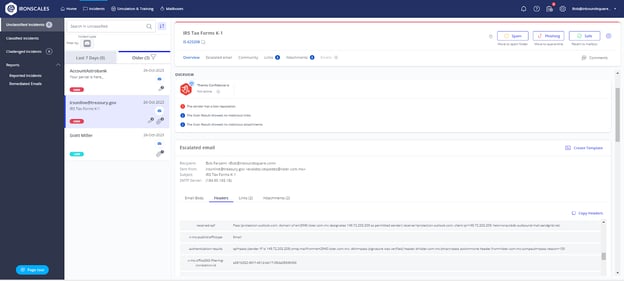
IRONSCALES Incident Reporting UI (source)
Enhance M365 Defender with advanced email security solutions
While M365 Defender provides a nice one-fits-all solution for email security, its capabilities can be enhanced further with some advanced custom solutions in the market:
- M365 API Integration: IRONSCALES offers seamless API integration with Microsoft 365 for companies looking to enhance MDO email security capabilities with an additional layer of anti-phishing protection against threats such as business email compromise, account takeover, and VIP impersonation.
Additionally, IRONSCALES Themis Copilot, seamlessly integrated with Outlook, serves as a real-time educational tool for users. This AI-powered “Security Guide” not only assists employees in understanding and identifying phishing emails but also educates them on the nuances of spotting such threats. This interactive feature significantly reduces the volume of reports and false positives that the IT Security team needs to review. It simplifies the process for users to report genuine suspicions, empowering them with the knowledge to discern potential threats and only escalate genuine concerns, thereby streamlining the overall security process.
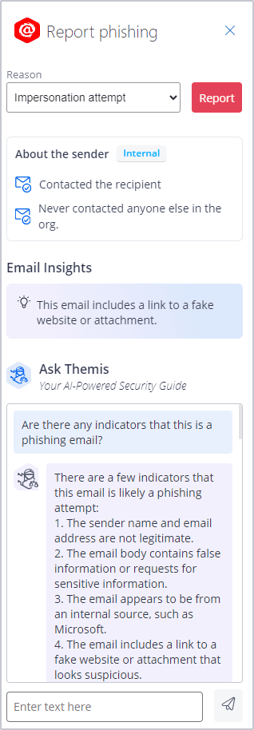
IRONSCALES Themis Copilot Phishing Button
- Tailored Up-To-Date Security Awareness Training: While MDO offers attack simulation training, it may not provide the level of customization some users require and requires the E5 (Plan 2) tier. On the other hand, IRONSCALES offers a flexible solution with up-to-date training materials and a comprehensive report platform.
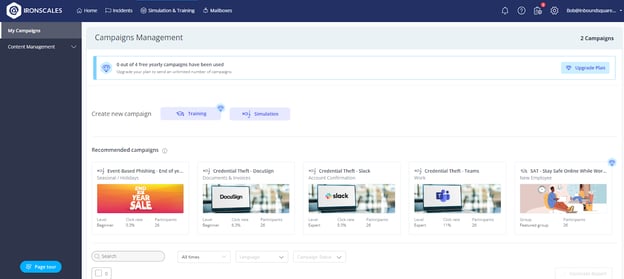
IRONSCALES training platform offers a variety of training awareness modules
- Detailed phishing simulation reports and analytics: IRONSCALES offers detailed, insightful reports on the results of phishing mail simulation exercises, aiding organizations in understanding their cybersecurity postures. These reports are integral to assessing the effectiveness of those campaigns and identifying potential vulnerabilities within the workforce. Through a user-friendly dashboard, users can access comprehensive analytics that details various aspects of the simulations, such as response rates, the types of phishing attacks that were most effective, and which departments or individuals might need further training. This level of detail in reporting allows for targeted and strategic improvements in an organization’s approach to cybersecurity awareness and training, ensuring a more robust defense against real-world phishing threats.
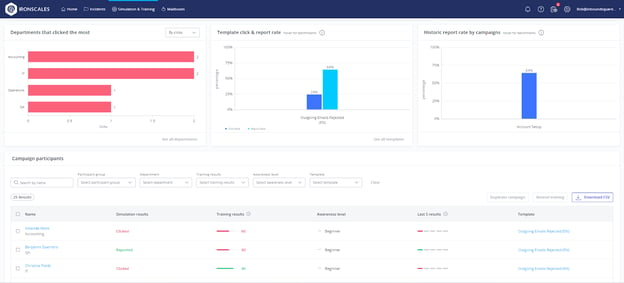
IRONSCALES Phishing Simulation UI (source)
Related guides in this series
- Microsoft 365 email security: series introduction
- Microsoft Defender for Office 365
- Microsoft Defender licenses
- Microsoft 365 license matrix
- Defender for Office 365 Plan 1 comes to E3: how to tune it
Conclusion
In this article, we compared Microsoft’s EOP and MDO, which offer valuable features to combat email security threats, with EOP serving as a fundamental solution and Defender offering an additional set of features and a more comprehensive approach.
Which of those tools is the right fit depends on different factors, such as budget, scalability, and compliance requirements. To complement the email security that M365 provides, we highly recommend you embrace the interactive IRONSCALES approach to add an extra layer of protection. You can also further explore the large variety of customizable and ready-to-use training programs, phishing simulations, reporting, integration with M365, etc., ensuring that you and your staff are appropriately trained and prepared for any cyber challenge coming their way.
Continue Reading this Series
Chapter: 10 Microsoft Defender XDR Advanced Hunting Queries
Learn about Microsoft Defender XDR's Advanced Hunting Queries (AHQ) feature and how it can enhance your incident response capabilities.
Read chapterChapter: 9 M365 License Matrix
Learn about the various licensing models and security features offered by Microsoft 365 to help organizations choose the most appropriate plan for their security needs.
Read chapterChapter: 8 Microsoft Defender For Office 365
Learn about the latest email security features of Microsoft Defender for Office 365, including Explorer, Advanced Hunting Queries, and Automated Investigation and Response, to combat the evolving threat of phishing attacks.
Read chapterChapter: 7 Microsoft ASR
Learn about Microsoft ASR rules and their impact on security, including licensing requirements, log analysis, and considerations for activation.
Read chapterChapter: 6 M365 Business Premium Defender
Learn how the M365 Business Premium license provides essential cybersecurity components, such as Microsoft Intune and Defender for Endpoint, to enhance overall security defense for small and mid-sized organizations.
Read chapterChapter: 5 Microsoft Defender Licenses
Learn about Microsoft's advanced threat protection platform, Defender XDR, and its various components and licensing models to enhance overall security for your organization.
Read chapterChapter: 4 Exchange Online Protection vs Defender For Office 365
Learn about Microsoft's Exchange Online Protection and Defender for Office 365, their features, best practices, and how they compare in email security.
Read chapterChapter: 3 M365 Phishing Simulation
Learn about the alarming growth in volume and sophistication of phishing attacks and how Microsoft 365’s Defender for Endpoint features can help enhance cyber resilience.
Read chapterChapter: 2 Anti-Phishing Policies In Microsoft 365
Learn about the various anti-phishing features and policies in Microsoft Defender, including their roles, locations, and configuration possibilities.
Read chapterChapter: 1 Office 365 Email Security
Learn about the crucial email security features of Microsoft Defender for Office 365 (MDO) and how they can protect users from phishing attacks.
Read chapter