TL;DR A phishing email impersonating a OneDrive file-share notification was sent from an outlook.com address through a county government mail server, causing SPF, DKIM, and DMARC to fail at the first authentication hop. When the message transited the recipient organization's Mimecast gateway, ARC re-signing produced passing authentication results that overwrote the original failures. The recipient tenant's IP allow-list for the Mimecast relay IP then assigned SCL -1, bypassing content filtering entirely. The OneDrive share lure included Mimecast-rewritten URLs pointing to 1drv.ms, adding visual plausibility. Four mailboxes received the message. The original triple authentication failure was buried under two layers of legitimate security infrastructure processing.
Severity: High Credential Harvesting Impersonation MITRE: {'id': 'T1566.002', 'name': 'Phishing: Spearphishing Link'} MITRE: {'id': 'T1036.005', 'name': 'Masquerading: Match Legitimate Name or Location'}
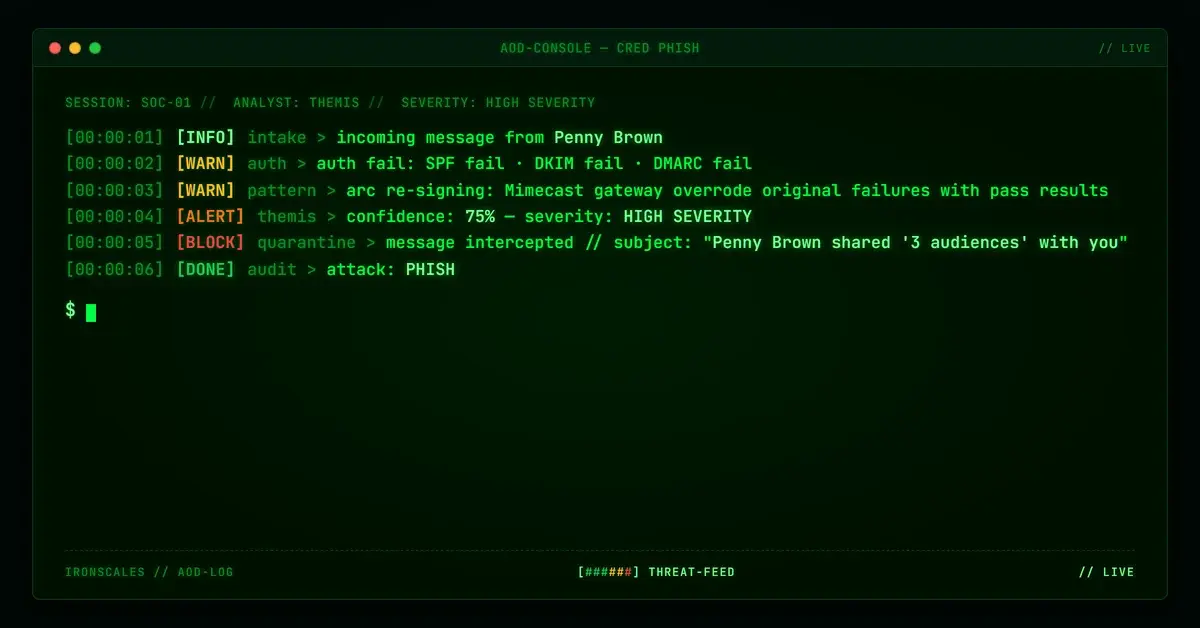
The email arrived with SCL -1. In Microsoft 365, that score means the message skipped spam filtering entirely. It landed in the inbox with the same confidence level as internal mail from a colleague down the hall. The subject line read "Penny Brown shared '3 audiences' with you," formatted exactly like a OneDrive file-share notification with a blue "Open" button, Microsoft privacy links, and the standard boilerplate footer.
SPF had failed. DKIM had failed. DMARC had failed. All three authentication checks came back negative at the first hop. By the time the message reached the recipient's mailbox, none of that mattered.
Two layers of legitimate infrastructure had washed the failures clean.
The First Hop: Everything Failed
The email claimed to come from outlook_943026362DE8005C@outlook[.]com. The originating IP was 64[.]124[.]105[.]98, which resolves to a mail server at a county government office in the southeastern United States. The PTR record confirms it: 64.124.105.98.IDIA-274172-ZYO.zip.zayo[.]com, a Zayo-hosted connection serving a municipal mail infrastructure.
This IP is not Microsoft's. It has no business sending mail on behalf of an outlook.com address. The authentication results at the first hop reflected that reality:
- SPF: FAIL. The IP is not in outlook.com's SPF record.
- DKIM: FAIL. No valid DKIM signature for outlook.com.
- DMARC: FAIL. Neither SPF nor DKIM aligned with the From domain.
At this point, the message should have been rejected or quarantined. A county government mail server sending as outlook.com is an unambiguous authentication failure. The message's journey should have ended here.
It didn't.
The Second Hop: ARC Re-Signing
The message's next stop was the recipient organization's Mimecast gateway at relay.mimecast[.]com (IP 170[.]10[.]152[.]241). This is the legitimate email security infrastructure that the recipient organization pays for and trusts.
When Mimecast processed the message, it performed its own authentication evaluation and recorded the results in ARC (Authenticated Received Chain) headers. The ARC-Authentication-Results from the Mimecast hop showed:
- DKIM: pass
- ARC: pass
- DMARC: pass
- SPF: pass
These results look clean. They also represent the Mimecast gateway's evaluation from its own vantage point, not the original authentication results from the first hop. The original triple failure at the county government server was now sitting underneath a layer of passing ARC results from a trusted security gateway.
This is the mechanism that makes ARC re-signing dangerous in the wrong configuration. ARC was designed to preserve authentication context across legitimate forwarding scenarios (mailing lists, internal relays, security gateways). The protocol assumes that each hop in the chain is trustworthy. When a security gateway ARC-re-signs a message that originally failed authentication, the downstream receiving server has to decide which set of results to trust: the original failures, or the gateway's passing assertion.
Most environments trust the gateway.
See Your Risk: Calculate how many threats your SEG is missing
The Third Layer: The Allow-List That Sealed It
The final delivery headers tell the rest of the story. The message arrived with SCL=-1 and IPV:CAL. That second tag means the sending IP matched a Connection Allow List entry in the recipient's M365 environment. The Mimecast relay IP was allow-listed, which is a standard configuration. Organizations route all inbound mail through their security gateway, then allow-list the gateway's outbound IPs so that relayed messages are not re-evaluated by M365's native filtering.
The configuration is rational. Without the allow-list, every message relayed through Mimecast would face double jeopardy from M365's own spam filters, creating false positives and delivery delays. The problem is what happens when the gateway relays a message that should have been stopped.
In this case, the allow-list gave SCL -1 to a message whose original authentication was a clean triple failure. The gateway's ARC re-signing had already overwritten the authentication picture. The allow-list then told M365 to skip its own content evaluation. Two independent trust mechanisms, each defensible on its own, combined to create a gap that delivered a phishing email with maximum inbox confidence.
The OneDrive Lure: Plausibility Through Familiarity
The email body was built to look like a standard OneDrive or SharePoint file-sharing notification. The "Open" call-to-action button, the "3 audiences" document title, the Microsoft privacy footer with links to go.microsoft[.]com, aka[.]ms, and privacy.microsoft[.]com. All of the visual elements that employees see daily when colleagues share files through Microsoft's ecosystem.
The URLs in the message had been rewritten by Mimecast during relay processing, which added another layer of apparent legitimacy. Mimecast-rewritten URLs pointing to 1drv[.]ms (Microsoft's URL shortener for OneDrive) look exactly like what employees expect to see from their organization's security gateway processing a legitimate OneDrive share.
No recipient personalization appeared in the message. The formatting was mass-target, which suggests this was part of a broader campaign rather than a targeted spearphish. Four mailboxes at the recipient organization received the email.
What the Authentication Chain Actually Showed
Laid out in sequence, the authentication story is clear:
- A message from an outlook.com address originates at a county government mail server that is not authorized to send for outlook.com.
- SPF, DKIM, and DMARC all fail at the first hop.
- The message transits a Mimecast gateway, which ARC-re-signs it with passing authentication results.
- The recipient's M365 tenant allow-lists the Mimecast relay IP, assigning SCL -1.
- The message lands in the inbox with zero spam indicators.
Each step in that chain involves legitimate infrastructure doing what it is configured to do. The county government server exists. The Mimecast gateway is the organization's real security platform. The allow-list is a standard operational configuration. The failure is not in any single component. The failure is that the chain, taken as a whole, laundered a set of authentication failures into a trusted delivery.
Recommendations
Organizations running security gateways with ARC re-signing and IP allow-lists should evaluate whether their configuration preserves original authentication failures or overwrites them.
- Audit ARC trust policies. If your M365 tenant is configured to trust ARC results from your gateway, verify that the gateway preserves and surfaces original authentication failures rather than replacing them wholesale.
- Implement conditional SCL override rules. Rather than blanket SCL -1 for all gateway-relayed traffic, create transport rules that apply SCL -1 only when the original authentication results (before gateway processing) also pass. Messages with original SPF/DKIM/DMARC failures should retain elevated SCL even after gateway relay.
- Monitor for credential harvesting lures that leverage familiar sharing patterns. OneDrive and SharePoint notification templates are among the most commonly impersonated email formats precisely because employees receive them routinely and have been conditioned to click "Open" without scrutiny.
- Review allow-list scope. A gateway IP allow-list that grants SCL -1 unconditionally means every message the gateway relays, including messages the gateway itself failed to catch, arrives with maximum inbox trust. Narrowing the allow-list scope or adding conditional evaluation reduces this exposure.
The email that reached four mailboxes in this case did not exploit a vulnerability. It exploited the space between two trust decisions that were never designed to be evaluated together.
Indicators of Compromise
| Type | Indicator | Context |
|---|
| Email | outlook_943026362DE8005C@outlook[.]com | Sender address; outlook.com but not sent from Microsoft infrastructure |
| IP | 64[.]124[.]105[.]98 | Originating IP; county government mail server |
| PTR | 64.124.105.98.IDIA-274172-ZYO.zip.zayo[.]com | Reverse DNS for originating IP |
| IP | 170[.]10[.]152[.]241 | Mimecast relay (relay.mimecast.com); allow-listed at recipient |
| Auth | SPF FAIL, DKIM FAIL, DMARC FAIL | Original authentication at first hop (outlook.com from non-Microsoft IP) |
| Auth | ARC dkim=pass, arc=pass, dmarc=pass, spf=pass | Mimecast ARC re-signed results |
| Delivery | SCL=-1, IPV:CAL | Final delivery; allow-listed IP bypassed spam filtering |
| URL | 1drv[.]ms | OneDrive short URL in Mimecast-rewritten links |
MITRE ATT&CK: T1566.002 Spearphishing Link, T1036.005 Masquerading: Match Legitimate Name or Location
Sources: IRONSCALES platform analysis; Microsoft Exchange Online Protection documentation (SCL values, IPV:CAL); RFC 8617 ARC Protocol; Verizon 2024 DBIR (phishing as primary initial access vector); CISA Phishing Guidance
Email Attack of the Day is a daily series from
IRONSCALES spotlighting real phishing attacks caught by Adaptive AI and our community of 36,000+ security professionals. Each post breaks down a real attack. What it looked like, why it worked, and what to do about it.







/Blue%20Feature%20Flower%20Icons/gear%20head%20icon.svg)
/Misc%20Icons/icon-nav-credential-theft.svg)










/Leadership%20Headshots/Audian%20Paxson%20Headshot%201000x1000%20032026.webp?width=100&height=100&name=Audian%20Paxson%20Headshot%201000x1000%20032026.webp)



.png?width=50&height=50&name=Untitled%20-%20July%2030%2c%202026%20at%2014.53.38%20(3).png)



/Misc%20Icons/icon-red-teaming-agent-gradient-simple.svg)
/Misc%20Icons/icon-phishing-soc-agent-gradient-simple.webp?width=158&height=167&name=icon-phishing-soc-agent-gradient-simple.webp)
/Misc%20Icons/icon-phishing-simulation-agent-gradient-simple.svg)


/Misc%20Icons/icon-nav-encryption.svg)