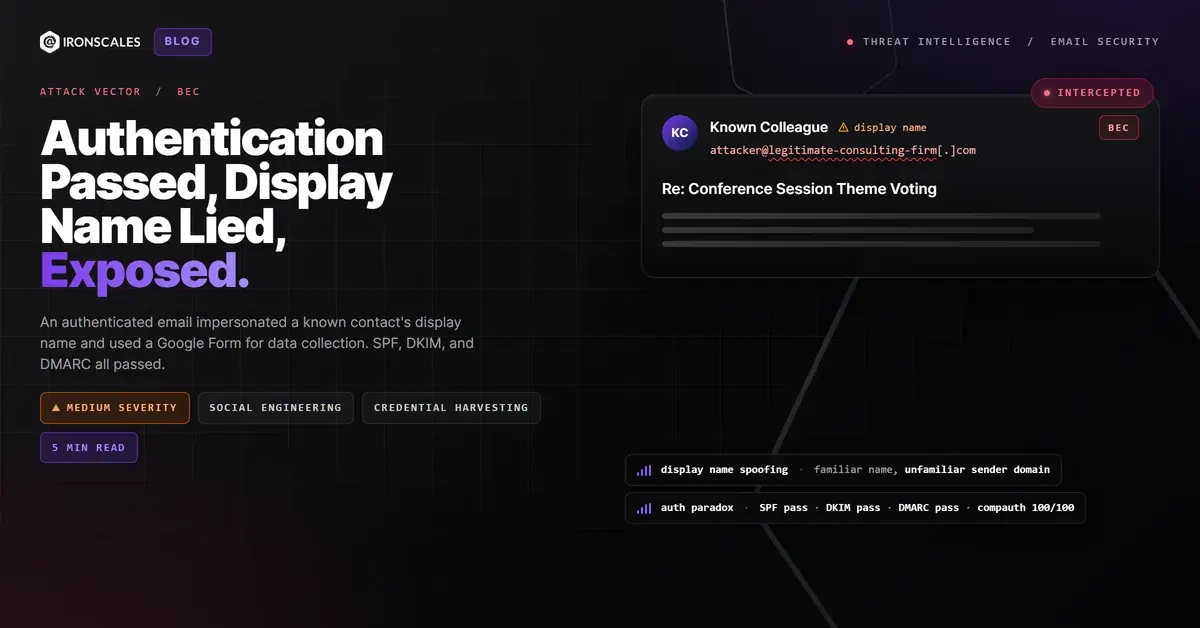
TL;DR A message impersonating the exact display name of a trusted colleague arrived from an authenticated business domain (SPF pass, DKIM pass, DMARC pass with p=none, compauth=100). The email asked recipients to complete a Google Form embedded in what appeared to be a legitimate conference planning thread with Zoom meeting details and calendar invitations. Every link resolved to Google or Zoom infrastructure and scanned clean. The recipient's mail client displayed an unfamiliar-sender banner, but the display name matched a known contact, creating a trust conflict designed to override caution. IRONSCALES flagged the impersonation at 54% confidence and quarantined the message across four affected mailboxes.
Severity: Medium Bec Social Engineering Credential Harvesting MITRE: T1566.002 MITRE: T1684.001 MITRE: T1598.003
The display name said it was a trusted colleague. SPF confirmed the sending domain. DKIM verified the message signature. DMARC passed with flying colors. Microsoft's own composite authentication scored it 100 out of 100. And buried in the body was a Google Form link that every scanner on the planet would call clean.
The only problem: the email address behind that display name belonged to someone else entirely.
The Trust Equation That Broke
The message arrived as a reply in an ongoing conference planning thread. The subject referenced a real industry event. The body asked a simple question about voting on session themes, with a link to a Google Form for collecting responses. Below the main message sat a full calendar invitation with Zoom meeting details, dial-in numbers, a whiteboard link, and an RSVP section listing over a dozen participants. It looked exactly like the kind of operational email that flows through professional organizations every day.
The sender's display name matched a known contact in the recipient's environment. That contact was associated with a personal email address the organization had communicated with previously. This message, however, came from a completely different domain, a legitimate consulting firm's address with full Google Workspace authentication. The recipient's mail client displayed the familiar name while simultaneously showing an unfamiliar-sender warning banner: "You don't often get email from this address."
That contradiction is the entire attack. The display name triggers recognition and trust. The unfamiliar-sender banner triggers caution. On desktop, both signals are visible. On mobile, where the X-Mailer header confirmed this message was composed, only the display name typically shows.
The FBI IC3 2024 Internet Crime Report attributed $2.77 billion in losses to BEC, with display name impersonation ranking among the most common initial vectors. The Verizon 2024 DBIR found that pretexting appeared in over 40% of breach-related social engineering actions. This attack uses both.
Why Every Scanner Said "Clean"
The authentication stack did exactly what it was designed to do, and that is the problem.
SPF passed. The sending IP (2607:f8b0:4864:20::32a) belongs to Google's mail infrastructure, which is explicitly included in the sending domain's SPF record. DKIM passed. The message carried a valid RSA-SHA256 signature with the domain's Google DKIM selector, proving the content was authorized by the domain's mail system. DMARC passed. The From header domain aligned with both SPF and DKIM. Microsoft's composite authentication (compauth) returned reason=100, its highest confidence score. The spam confidence level was SCL=1.
The domain itself was registered in 2003, uses Google Workspace for mail routing, and has been operational for over two decades. There is nothing technically suspicious about the infrastructure.
But DMARC's policy was set to p=none. This means that even if a future message from this domain fails authentication, receiving servers will report the failure but still deliver the message. It is a monitoring configuration, not an enforcement one. According to the Microsoft Digital Defense Report 2024, the majority of domains involved in BEC campaigns either lack DMARC records entirely or publish permissive p=none policies that provide visibility without protection.
The links told the same story. The Google Form resolved to docs[.]google[.]com. Calendar links pointed to calendar[.]google[.]com. Zoom meeting links resolved to us02web[.]zoom[.]us. Every URL was hosted on legitimate infrastructure owned by the platforms themselves. Link scanners returned clean verdicts across all 20+ embedded URLs.
When the domain is real, the authentication is valid, and every link points to a trusted platform, the entire attack surface collapses to a single field: the display name. And display names have zero authentication requirements.
See Your Risk: Calculate how many threats your SEG is missing
Google Forms: The Data Collection Vehicle Hiding in Plain Sight
Google Forms is an increasingly common vehicle for phishing-adjacent data collection because it solves three problems for attackers simultaneously. First, the form is hosted on Google's own domain, inheriting its TLS certificate, domain reputation, and implicit trust. Second, the form URL is long and opaque, making it difficult for recipients to assess the destination before clicking. Third, Google Forms can be configured to automatically collect the respondent's email address, meaning the attacker captures identity data regardless of what the form fields request.
In this case, the form was embedded in what appeared to be a legitimate voting process for conference session themes. The social engineering worked at the organizational level: recipients who were involved in the conference planning would have expected exactly this kind of request. The attacker (or compromised account) was leveraging real organizational context to make the ask indistinguishable from routine coordination.
The MITRE ATT&CK framework classifies this as T1598.003 (Phishing for Information: Spearphishing Link), where the objective is data collection rather than malware delivery. Combined with T1566.002 (Spearphishing Link) and T1684.001 (Impersonation), the technique chain maps a low-noise, high-yield social engineering operation.
Observed Indicators: Display Name Impersonation via Google Form
| Indicator | Type | Context |
|---|
| kinderr@praecipio[.]com | Email | Authenticated sending address (display name impersonation) |
| praecipio[.]com | Domain | Sending domain, registered 2003, Google Workspace, DMARC p=none |
| 2607:f8b0:4864:20::32a | IP | Google mail relay (SPF authorized) |
| docs[.]google[.]com/forms/d/e/1FAIpQLScJCX0wlkYy7ncgA6fMc1uNx678RLzWg8qPYMzUsaf5U43PrA/viewform | URL | Google Form data-collection endpoint |
spf=pass, dkim=pass, dmarc=pass | Auth | Full authentication suite passed |
compauth=pass reason=100 | Auth | Microsoft composite authentication, maximum confidence |
SCL=1 | Spam Score | Low spam confidence, effectively trusted |
SFTY:9.25 | Flag | Microsoft safety tip: display name impersonation detected |
DMARC p=none | Policy | Monitoring only, no enforcement on authentication failures |
| iPhone Mail (23D8133) | X-Mailer | Message composed on iOS Mail client |
When the Name Is the Only Weapon, Only Behavior Catches It
IRONSCALES flagged this message at 54% confidence based on behavioral signals that no authentication protocol evaluates: the display name matched a known contact but the sending address did not, the sender domain had never communicated with the organization in this pattern before, and the embedded Google Form represented an external data-collection point delivered under the guise of internal coordination.
Four mailboxes received the message. All four were quarantined.
Organizations should enforce strict DMARC policies (p=reject) on their own domains to prevent outbound impersonation. But inbound display name impersonation from authenticated external domains requires a different defense: behavioral AI that cross-references display names against known contact databases, flags mismatches between display identity and sending address, and evaluates the contextual plausibility of embedded data-collection links. The IBM Cost of a Data Breach Report 2024 found the average cost of a data breach reached $4.88 million. That number starts with someone trusting a familiar name attached to an unfamiliar address.
The display name is the last unprotected field in email. Until your security stack treats it as an attack surface, it will keep being one.
Email Attack of the Day is a daily series from
IRONSCALES spotlighting real phishing attacks caught by Adaptive AI and our community of 36,000+ security professionals. Each post breaks down a real attack. What it looked like, why it worked, and what to do about it.







/Blue%20Feature%20Flower%20Icons/gear%20head%20icon.svg)
/Misc%20Icons/icon-nav-credential-theft.svg)










/Leadership%20Headshots/Audian%20Paxson%20Headshot%201000x1000%20032026.webp?width=100&height=100&name=Audian%20Paxson%20Headshot%201000x1000%20032026.webp)



.png?width=50&height=50&name=Untitled%20-%20July%2030%2c%202026%20at%2014.53.38%20(3).png)



/Misc%20Icons/icon-red-teaming-agent-gradient-simple.svg)
/Misc%20Icons/icon-phishing-soc-agent-gradient-simple.webp?width=158&height=167&name=icon-phishing-soc-agent-gradient-simple.webp)
/Misc%20Icons/icon-phishing-simulation-agent-gradient-simple.svg)


/Misc%20Icons/icon-nav-encryption.svg)