TL;DR An engineering firm received what looked like a routine DocuSign signature request. The envelope was real, sent from DocuSign's own infrastructure, so SPF, DKIM, and DMARC all passed cleanly. But the subject line was blank, the sender persona claimed to be a state business directory, and the Reply-To address pointed to a DocuSign styled lookalike domain registered only months earlier with no authentication of its own. Platform authentication proved the envelope was real. It said nothing about who was waiting on the other end of a reply.
Severity: High Brand-Impersonation Reply-To-Abuse Business-Email-Compromise MITRE: T1566.002 MITRE: T1036.005
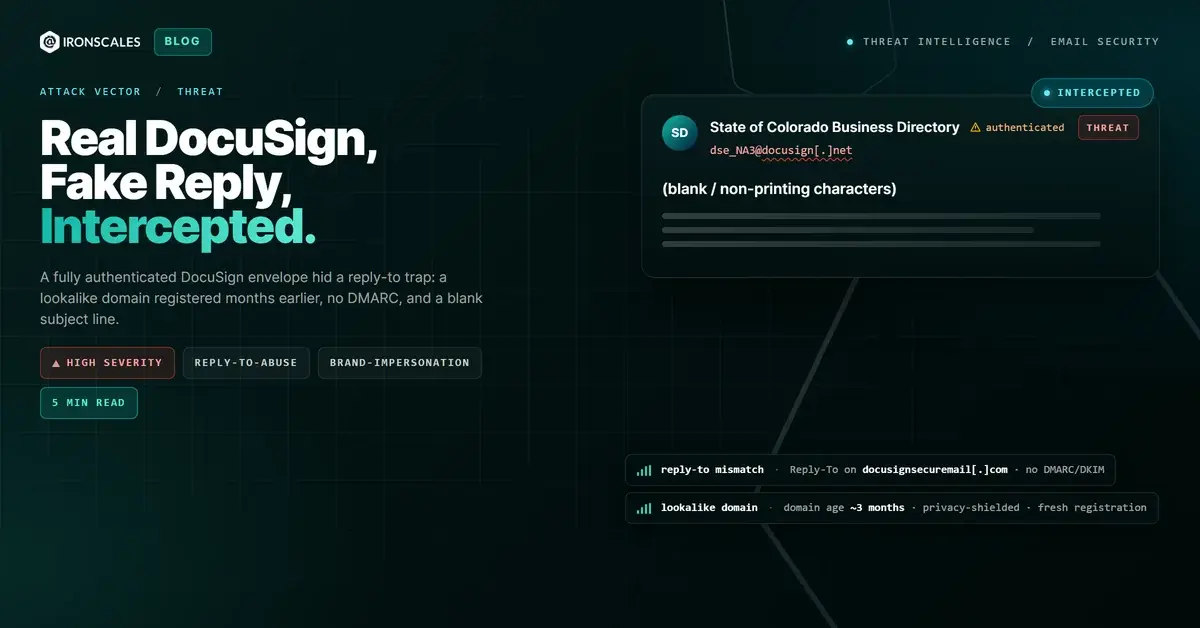
A single mailbox at an engineering and professional-services firm received what looked like the most ordinary request in the modern workday: a DocuSign envelope asking someone to review and sign a document. The email came from dse_NA3@docusign[.]net. Its call to action was a genuine na3.docusign[.]net signing link. When the platform ran the authentication checks, everything passed. SPF passed. DKIM passed for docusign[.]net. DMARC passed. Composite authentication returned a clean result. By every technical measure a legacy gateway cares about, this was DocuSign talking to a customer.
It was, in fact, a real DocuSign envelope. That is exactly what made it dangerous.
When the envelope is real but the reply channel is not
Attackers have learned that the fastest way past authentication is to stop fighting it. Instead of spoofing DocuSign and failing SPF, this sender created a genuine envelope inside DocuSign's own platform and let it authenticate honestly. The trusted infrastructure did the heavy lifting of delivery. The deception was bolted on top, in the two places platform authentication never inspects: the visible sender identity and the Reply-To header.
The display name on the message read "State of Colorado Business Directory via Docusign." That persona has nothing to do with a signature request an engineering firm would expect, and it is not a contact the recipient had a relationship with. It exists to borrow two layers of trust at once, a government-sounding authority and the DocuSign brand, and to make a busy professional assume the envelope is a routine compliance formality.
A blank subject and a persona that does not belong
The subject line was effectively blank, built from invisible or non-printing characters rather than readable text. That is not an accident. A blank subject sidesteps subject-based keyword filters and, more importantly, forces the recipient to open the message and lean on the sender identity and the DocuSign chrome to decide what it is. Strip away the words and the brand does the persuading.
Everything the recipient could see pointed at DocuSign. The envelope was real, the signing link was real, the logos were real. Nothing in that surface told the recipient where a reply would actually go.
The lookalike domain waiting on the reply
The Reply-To address was secureadmin@docusignsecuremail[.]com. That domain is not DocuSign. docusignsecuremail[.]com was registered through NameSilo only a few months before this email was sent, shielded behind a privacy service, and it published no DMARC and no DKIM records of its own. It is a DocuSign styled string chosen to survive a glance, the kind of name that reads as "DocuSign secure mail" to a person skimming an inbox and reads as an unrelated, unauthenticated, freshly minted domain to anyone who checks.
This is the mechanics of the whole attack. The genuine docusign[.]net envelope earns delivery. The moment the recipient hits reply, the conversation leaves DocuSign entirely and lands in a mailbox the attacker controls, on a domain with no reputation, no history, and no authentication to hold it accountable. From there the pretext can escalate at the attacker's pace: a request to confirm banking details, redirect a payment, or approve a fraudulent document, all under the borrowed authority of a state directory and a trusted e-signature brand. It is the opening move of a business email compromise sequence, delivered through a channel most controls trust by default.
The tell hiding behind a clean pass
Authentication answered the wrong question. SPF, DKIM, and DMARC confirmed that the envelope truly came from DocuSign. None of them, by design, validate the visible sender persona or the Reply-To address. As the DMARC specification itself makes clear in RFC 7489, alignment is checked against the domain in the From header, not against a mismatched Reply-To. A gateway that stops at the auth verdict sees a green light and moves on.
IRONSCALES read the message the way a suspicious human would. Our Adaptive AI weighed the signals authentication could not: a sender persona with no established relationship to the recipient, a subject line emptied of readable content, a DocuSign brand claim paired with a Reply-To on an unrelated, recently registered, privacy-shielded domain that carried none of DocuSign's authentication. Themis flagged the message on that brand-and-identity mismatch, not on the auth result, which was flawless. This is the same behavioral layer that underpins business email compromise protection: the value is in catching the identity story the headers tell, not just the cryptographic one.
The technique is not exotic, which is precisely why it works at scale. The 2024 Verizon Data Breach Investigations Report found phishing present in 15% of breaches and the human element involved in 68% of them, with pretexting, largely business email compromise, the leading social-engineering pattern. Attacks that hand a filter a perfect authentication result and save the fraud for the reply channel are built specifically to exploit that human element.
Indicators of Compromise
| Indicator | Value | Notes |
|---|
| Sender address | dse_NA3@docusign[.]net | Genuine DocuSign envelope infrastructure |
| Display name | State of Colorado Business Directory via Docusign | Fabricated sender persona |
| Reply-To | secureadmin@docusignsecuremail[.]com | Attacker-controlled lookalike, no DMARC/DKIM |
| Lookalike domain | docusignsecuremail[.]com | Registered a few months before send, privacy-shielded (NameSilo) |
| CTA link | hxxps://na3.docusign[.]net/... | Genuine DocuSign signing link |
| Subject | (blank / non-printing characters) | Filter evasion |
| Authentication | SPF pass, DKIM pass (docusign[.]net), DMARC pass | Clean auth for the real envelope |
MITRE ATT&CK mapping
What security teams should take away
A passing authentication result tells you an envelope came from where it claims. It does not tell you who is waiting on the other end of a reply. When a message rides in on a legitimate platform, the fraud tends to move to the layers authentication never inspects: the sender persona, the subject, and above all the Reply-To. Treat a mismatch between a trusted brand and an unrelated, freshly registered reply domain as a high-confidence signal in its own right, and put detection in front of it that reasons about identity and relationship rather than cryptographic pass or fail. If you want to see how that behavioral layer handles authenticated-but-deceptive mail against your own traffic, request a demo.
Email Attack of the Day is a daily series from
IRONSCALES spotlighting real phishing attacks caught by Adaptive AI and our community of 36,000+ security professionals. Each post breaks down a real attack. What it looked like, why it worked, and what to do about it.







/Blue%20Feature%20Flower%20Icons/gear%20head%20icon.svg)
/Misc%20Icons/icon-nav-credential-theft.svg)










/Leadership%20Headshots/Audian%20Paxson%20Headshot%201000x1000%20032026.webp?width=100&height=100&name=Audian%20Paxson%20Headshot%201000x1000%20032026.webp)



.png?width=50&height=50&name=Untitled%20-%20July%2030%2c%202026%20at%2014.53.38%20(3).png)



/Misc%20Icons/icon-red-teaming-agent-gradient-simple.svg)
/Misc%20Icons/icon-phishing-soc-agent-gradient-simple.webp?width=158&height=167&name=icon-phishing-soc-agent-gradient-simple.webp)
/Misc%20Icons/icon-phishing-simulation-agent-gradient-simple.svg)


/Misc%20Icons/icon-nav-encryption.svg)