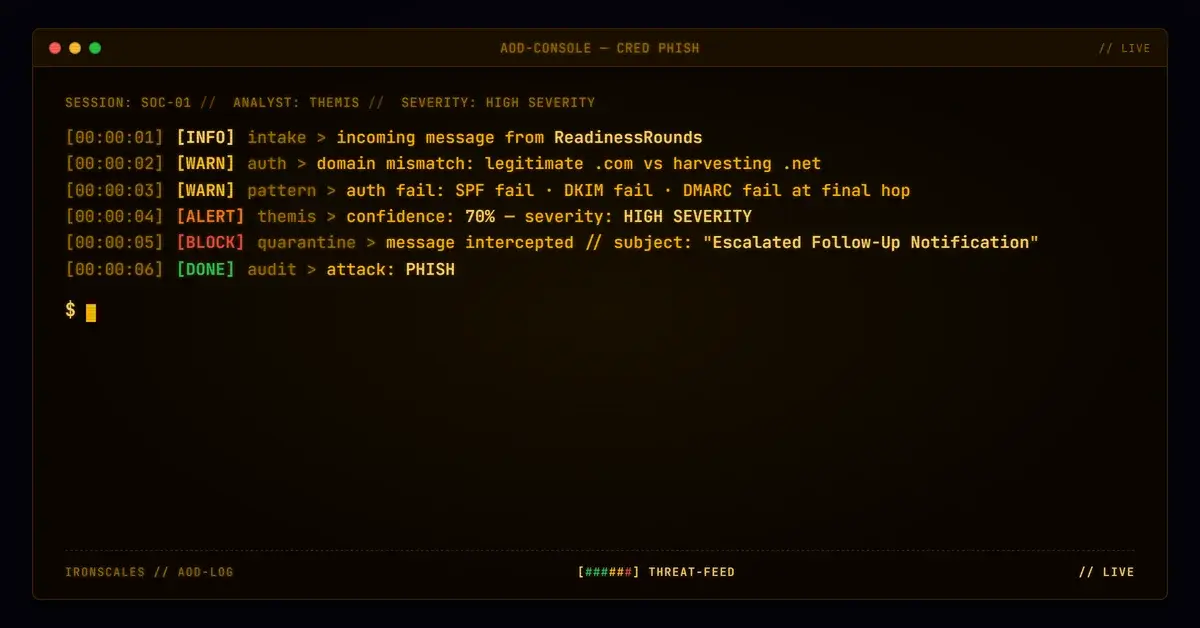
TL;DR A notification email from processing@readinessrounds[.]com directed a healthcare worker to sign in at readinessrounds[.]net, a different domain from the vendor's legitimate readinessrounds[.]com site. The .net domain hosted an active login form that collected email and password credentials. Authentication passed at the initial Microsoft outbound hop (SPF pass, DKIM pass, DMARC pass) but degraded through a Cisco IronPort relay, producing SPF softfail, DKIM fail, and DMARC fail at the final evaluation. The ARC chain broke at i=2 (cv=fail). Despite the authentication failures, the message was delivered at SCL -1 because the IronPort relay was allow-listed.
Severity: High Credential Harvesting Vendor Impersonation MITRE: T1566.002 MITRE: T1036.005 MITRE: T1078.004
The difference between .com and .net is four characters. In a URL bar, on a mobile screen, in the middle of a workday, most people do not notice it. An attacker targeting a large public health system exploited exactly this by directing recipients to a credential-harvesting page on a .net domain that mirrored the vendor's legitimate .com login portal. The page was active, branded correctly, and collected real credentials through a functional login form.
The email passed full authentication at its first hop. By the time it reached the recipient's inbox, SPF, DKIM, and DMARC had all failed. The ARC chain was broken. The message was delivered at SCL -1 anyway.
Vendor-Branded, Wrong Domain
The email arrived from processing@readinessrounds[.]com, a domain registered since 2008 that appears to belong to a legitimate healthcare compliance and training vendor. The message subject referenced an escalated follow-up notification and named the recipient directly. The body included vendor branding, a confidentiality footer, a HIPAA notice, and a contact phone number consistent with the vendor's public information.
Two links in the email directed the recipient to ws-01.readinessrounds[.]net/RR/Account/Login.aspx, a login page that presented a functional email/password form under "ReadinessRounds Login" branding. The page used valid TLS and visually matched what a healthcare worker would expect from their training platform.
The problem: the vendor's legitimate domain is readinessrounds[.]com. The credential page was on readinessrounds[.]net, a separate domain registered in September 2010. While both domains have been registered for years (reducing the effectiveness of domain-age heuristics), they are distinct registrations. The .net domain lacked published email authentication records (no SPF, no DMARC, no DKIM for the web host), which is typical of domains used for web hosting rather than email sending, but it also means there are no authentication controls to verify the identity of anyone operating the site.
See Your Risk: Calculate how many threats your SEG is missing
Authentication Passed, Then Broke
The message's authentication journey tells a story of progressive degradation:
Hop 1 (origin): The email was submitted from IP 38.100.176.98 through Microsoft's Exchange Online Protection. At this stage, SPF passed (readinessrounds[.]com designates the IP as a permitted sender), DKIM was not present but not required, and DMARC passed (p=none, so the pass was informational only). The ARC chain was initialized with cv=none.
Hop 2 (Cisco IronPort): The message transited esa3.hc3244-53.iphmx.com (139.138.34.191), a Cisco IronPort appliance operating as the healthcare organization's inbound email security gateway. IronPort recorded its own authentication evaluation: SPF pass, DKIM pass (after the Microsoft outbound hop added a DKIM signature), DMARC pass.
Hop 3 (final delivery): When Microsoft's protection service re-evaluated the message after the IronPort relay, authentication collapsed. SPF returned softfail (139.138.34.191 is not in readinessrounds[.]com's SPF record). DKIM failed (the signature did not verify, likely because IronPort modified the message during inspection). DMARC failed because neither SPF nor DKIM aligned. The ARC chain showed cv=fail at i=2, meaning the chain of trust was broken.
Despite the triple authentication failure, the IronPort relay IP was allow-listed by the receiving tenant (IPV:CAL), and the final SCL was set to -1. Four mailboxes received the message. No automated mitigation was taken.
The IronPort's own reputation assessment tells a parallel story: X-IronPort-Reputation scored the sending IP at 2.9, placing it in the GREYLIST sender group with $MEDIUM_THROTTLE flow policy. The Talos threat scanner returned a "Negative" verdict. The relay passed the message through based on its own assessment, even as the authentication signals it generated would fail downstream.
The Attachment Anomaly
The message included a small image attachment (ATT00001, declared as image/jpg but actually a 120x40 pixel PNG). Static analysis found no embedded URLs, QR codes, or steganographic payloads. The file type mismatch (declared JPG, actual PNG) is an anomaly but not conclusive of malicious intent on its own. The attachment appears to be a branding element (possibly a vendor logo) rather than a payload delivery mechanism.
IRONSCALES Adaptive AI evaluated the message at 70% confidence, identifying phishing indicators in the email's content structure and authentication signals. The message was automatically resolved as phishing.
MITRE ATT&CK Alignment
| Technique | ID | Application |
|---|
| Phishing: Spearphishing Link | T1566.002 | Credential-harvesting link to .net domain login form |
| Match Legitimate Name or Location | T1036.005 | Vendor branding and domain name closely matching legitimate .com |
| Cloud Accounts | T1078.004 | Credential collection targeting cloud-hosted healthcare platform login |
IOC Summary Table
| Type | Indicator | Context |
|---|
| Sending Domain | readinessrounds[.]com | Legitimate vendor domain used as From address |
| Sending Email | processing@readinessrounds[.]com | Envelope sender |
| Credential Domain | readinessrounds[.]net | Domain hosting the credential-harvesting login form |
| Credential URL | ws-01[.]readinessrounds[.]net/RR/Account/Login.aspx | Active login form collecting email/password |
| Sending IP (origin) | 38[.]100[.]176[.]98 | Original submission IP |
| Relay IP (IronPort) | 139[.]138[.]34[.]191 | Cisco IronPort (esa3.hc3244-53.iphmx.com) |
| IronPort Reputation | 2.9 | Low reputation score, GREYLIST sender group |
| SPF Result (final) | SoftFail | IronPort IP not in sender's SPF record |
| DKIM Result (final) | Fail | Signature broke during IronPort transit |
| DMARC Result (final) | Fail | No aligned authentication at final hop |
| ARC Chain | cv=fail at i=2 | Broken chain of trust |
| SCL (final) | -1 | Allow-listed relay, delivered to inbox |
| Attachment | ATT00001 (120x40 PNG declared as JPG) | Branding image, no malicious payload detected |
What This Case Demands From Your Stack
Domain extension confusion is not a new technique, but it remains effective because most security tools evaluate the sending domain's authentication, not the relationship between the sending domain and the domains in the message body.
Compare link domains against the sender domain. When an email from vendor.com contains links to vendor.net, that mismatch should trigger a flag. Identical second-level domains with different TLDs are a high-signal indicator that requires minimal processing to detect and produces very few false positives.
Do not trust authentication results from allow-listed relay IPs unconditionally. An allow-list for a security gateway should not suppress authentication evaluation entirely. If SPF, DKIM, and DMARC all fail at the final hop, that information should remain visible to downstream detection engines even if the message is delivered.
Treat ARC chain failures as an escalation trigger. A broken ARC chain means no hop in the delivery path can vouch for the message's original authentication. When ARC fails and the message contains a credential-collection link, the combination should elevate the message to manual review or quarantine regardless of allow-list status.
Email Attack of the Day is a daily series from
IRONSCALES spotlighting real phishing attacks caught by Adaptive AI and our community of 36,000+ security professionals. Each post breaks down a real attack. What it looked like, why it worked, and what to do about it.







/Blue%20Feature%20Flower%20Icons/gear%20head%20icon.svg)
/Misc%20Icons/icon-nav-credential-theft.svg)










/Leadership%20Headshots/Audian%20Paxson%20Headshot%201000x1000%20032026.webp?width=100&height=100&name=Audian%20Paxson%20Headshot%201000x1000%20032026.webp)



.png?width=50&height=50&name=Untitled%20-%20July%2030%2c%202026%20at%2014.53.38%20(3).png)



/Misc%20Icons/icon-red-teaming-agent-gradient-simple.svg)
/Misc%20Icons/icon-phishing-soc-agent-gradient-simple.webp?width=158&height=167&name=icon-phishing-soc-agent-gradient-simple.webp)
/Misc%20Icons/icon-phishing-simulation-agent-gradient-simple.svg)


/Misc%20Icons/icon-nav-encryption.svg)