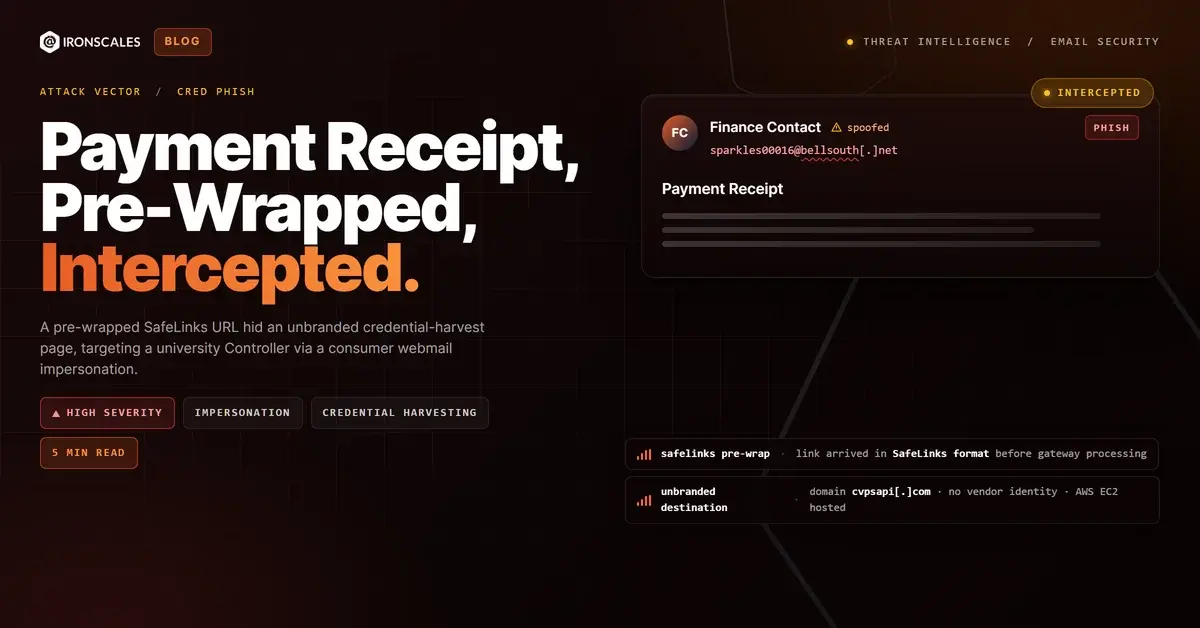
TL;DR An attacker sent a minimal payment-receipt lure from a consumer account to a university Controller, impersonating a finance contact by display name. The link arrived already encoded in Microsoft SafeLinks, the recipient environment's own time-of-click rewriter, so the gateway treated the wrapper as its own work. Behind the wrapper sat an unbranded page on AWS-hosted infrastructure with redacted ownership and no connection to any known payments processor. The external-sender banner fired, but the SafeLinks coating muted the visual alarm.
Severity: High Credential Harvesting Impersonation Phishing MITRE: T1566.002 MITRE: T1598.003
A university Controller received an email from a contact whose display name matched the finance context of their role. The body contained a single line of text and one link labeled as a payment receipt. The signature read "Sent from my iPhone." There was no invoice number, no vendor name, no dollar amount, no context at all.
The link was already wrapped in Microsoft SafeLinks.
That detail is the whole attack. The attacker's goal was not to build a convincing message. It was to borrow the visual credibility of the recipient's own security tooling and park an unbranded credential page behind it.
How the lure was constructed
The sender was a consumer webmail account, not a corporate address. The display name was chosen to echo the recipient's role and organizational context, a classic impersonation technique: pick a name the target will not immediately challenge, combine it with a scenario that fits their daily responsibilities, and keep the body short enough that there is nothing to scrutinize.
Controllers manage institutional payments. A payment receipt is an entirely plausible thing to appear in their inbox. The lure needed no elaborate pretext because the job title did the framing work.
The organization's mail environment did display an external-sender banner, a clear notice that the message originated outside the institution. That banner existed. It fired. But banners are advisory labels, not controls, and the SafeLinks wrapping introduced a competing visual signal that an experienced user might reasonably interpret as evidence the link had already been scanned.
The SafeLinks problem
URL rewriting is a standard feature of enterprise email security. When a message arrives, the system replaces links with redirect URLs hosted by the security vendor. When the user clicks, the system re-evaluates the destination in real time before allowing access.
What the analysis showed here is that the link arrived already encoded in the SafeLinks format, using the nam11.safelinks.protection.outlook.com wrapper. This is the same wrapper the recipient environment would produce if it had processed a clean link on its own. The attacker had pre-constructed that wrapper before sending.
The decoded destination was hxxps://v3[.]cvpsapi[.]com/Payments/Receipt/View.aspx?pid=2706066.
The domain cvpsapi[.]com is not a known payments processor. It carries no public brand identity. WHOIS registration details are fully redacted. The hosting IP resolves to an AWS EC2 compute range with no reverse-DNS branding. The URL structure, a path with Payments/Receipt/View.aspx and a numeric pid parameter, is designed to read as a real receipt retrieval endpoint.
There is no payments vendor here. The page is a staging environment dressed in receipt-shaped URL syntax.
The SafeLinks wrapper also embedded encoded recipient metadata in its parameters. That is a separate signal: the attacker incorporated the target's own address into the link construction, which indicates this was not a spray-and-pray campaign. The Controller's email address was in the wrapper before the message was sent.
What the gateway could not see
The analysis could not adjudicate full SPF, DKIM, and DMARC alignment from available headers because complete relay data was not present in the case record. What is clear is that the sender was an external consumer account, that the organization's system flagged it with an external-sender banner, and that the link nonetheless passed through delivery.
The core detection gap is structural. A gateway performing credential harvesting detection on an incoming link evaluates the destination after decoding. If the link arrives already wrapped in the gateway's own format, the system may treat it as previously vetted rather than as new input to evaluate. The pre-wrapping does not break technical controls, but it shifts the attention of the recipient from the destination domain toward the familiar wrapper format. That is the only thing the attacker needed.
The landing page tells you what the message would not
Every legitimate payment receipt carries identifying information. A vendor sends you a receipt because they want you to recognize the transaction: there is a vendor name, an invoice number, a date, an amount. The page behind v3[.]cvpsapi[.]com offered none of that.
An unbranded page on redacted-registrant infrastructure asking a Controller to authenticate to view a receipt is not how any real payment system works. That mismatch, the total absence of vendor identity combined with a login or data-entry prompt, is the fingerprint of a credential-harvest staging environment. The attacker was building a dossier of university finance credentials, not delivering a receipt.
Indicators of Compromise
| Type | Indicator | Context |
|---|
| Domain | v3[.]cvpsapi[.]com | Decoded SafeLinks destination; unbranded payment-receipt staging page, AWS EC2 hosted |
| URL | hxxps://v3[.]cvpsapi[.]com/Payments/Receipt/View.aspx?pid=2706066 | Full decoded landing URL with numeric pid token |
| Email | sparkles00016@bellsouth[.]net | Attacker sending address, consumer webmail, display name impersonating finance contact |
| Behavior | Pre-encoded SafeLinks wrapper on inbound mail | Link arrived in SafeLinks format before recipient environment processing |
| Behavior | Recipient email encoded in wrapper parameters | Targeted construction; victim address embedded in the link before send |
| Behavior | Unbranded payments page, no vendor or invoice context | No legitimate payments processor operates this way |
What actually caught it
The analysis flagged the decoded destination domain as high-risk based on the absence of public identity, the redacted registrant record, and the AWS hosting pattern. The mismatch between the external-sender banner and the pre-wrapped link format was a secondary signal: the attacker had made the message look processed when it had not been processed in a meaningful way. Behavioral scoring returned a medium-confidence suspicious classification, not a definitive block, which is why the teardown matters.
The gap this attack exploits is the trust a trained user extends to familiar security UI. If the link looks like a SafeLinks URL, the intuitive read is that someone already checked it. That intuition is wrong when the wrapper was built by the attacker. The only reliable defense is checking the decoded destination, not the wrapper format.
See Your Risk: Calculate how many threats your SEG is missing
Finance roles are targeted precisely because payment and receipt scenarios are indistinguishable from their routine work. A one-line email with a single link and a plausible pretext will always land in inboxes. The variable is whether the destination gets evaluated on its own terms rather than on the credibility of the wrapper around it.
When a receipt carries no vendor, no amount, and no invoice number, there is nothing to receipt. The link is the only payload, and the page is waiting for credentials.
Email Attack of the Day is a daily series from
IRONSCALES spotlighting real phishing attacks caught by Adaptive AI and our community of 36,000+ security professionals. Each post breaks down a real attack. What it looked like, why it worked, and what to do about it.







/Blue%20Feature%20Flower%20Icons/gear%20head%20icon.svg)
/Misc%20Icons/icon-nav-credential-theft.svg)










/Leadership%20Headshots/Audian%20Paxson%20Headshot%201000x1000%20032026.webp?width=100&height=100&name=Audian%20Paxson%20Headshot%201000x1000%20032026.webp)



.png?width=50&height=50&name=Untitled%20-%20July%2030%2c%202026%20at%2014.53.38%20(3).png)



/Misc%20Icons/icon-red-teaming-agent-gradient-simple.svg)
/Misc%20Icons/icon-phishing-soc-agent-gradient-simple.webp?width=158&height=167&name=icon-phishing-soc-agent-gradient-simple.webp)
/Misc%20Icons/icon-phishing-simulation-agent-gradient-simple.svg)


/Misc%20Icons/icon-nav-encryption.svg)