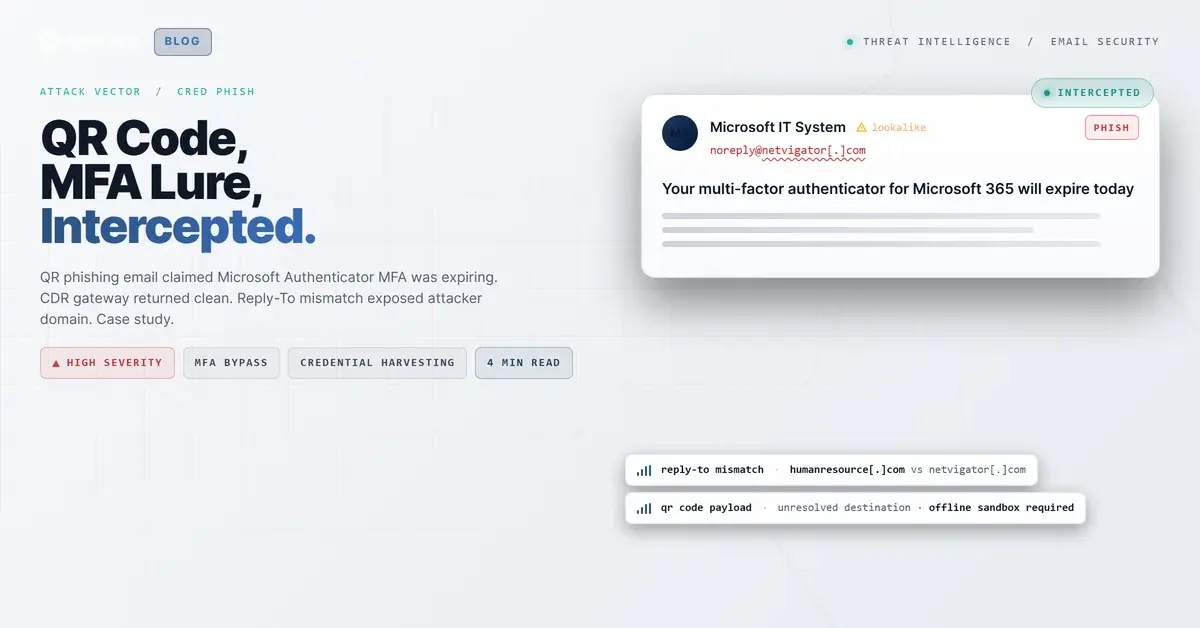
TL;DR An email purporting to be from Microsoft 365 IT told recipients their MFA enrollment was expiring and instructed them to scan an embedded QR code to reauthenticate. The image attachment msauth.jpg passed a content-disarm-and-reconstruction gateway without the QR payload being decoded. A Reply-To mismatch pointed to an attacker-controlled domain. The IRONSCALES community flagged it as phishing before any user scanned the code.
Severity: High Qr Phishing Mfa Bypass Credential Harvesting Brand Impersonation MITRE: T1566 MITRE: T1078 MITRE: T1111
A fabricated Microsoft Authenticator expiration notice arrived in corporate inboxes with one goal: get an employee to point a phone camera at a QR code. No URL to click. No attachment to execute. Just an image, a deadline, and a mismatched Reply-To address that the gateway missed entirely.
What the Email Looked Like
The message arrived with a From display name styled as an automated IT system identifier, complete with a numeric suffix that mimicked an internal tracking reference. The subject line announced that the recipient's "multi-factor authenticator for Microsoft 365 will expire today," citing an explicit date to force same-day action.
The body copied Microsoft Authenticator branding, reproduced a Microsoft corporate address in the footer, and included standard-looking legal boilerplate. Two things broke the illusion on close inspection: a misspelling in the action sentence ("reauhenticate") and duplicated instructional text that appeared twice, suggesting a copy-paste error from a template. The Contact/Support hyperlink in the HTML resolved to a placeholder href="#" rather than any real support URL.
The core payload was an inline image attachment named msauth.jpg. That image contained a QR code the message instructed recipients to scan to complete reauthentication. No other clickable external URL existed in the email body.
The envelope came from netvigator[.]com (a Hong Kong ISP), with full SPF, DKIM, and DMARC pass on the original inbound hop. The Reply-To header pointed to do-not-reply[@]humanresource[.]com, a domain that has no relationship to Microsoft or to the sending ISP.
Why It Bypassed Defenses
Three layered factors let this reach the inbox.
The CDR gateway decoded the file type, not the payload. A Votiro content-disarm-and-reconstruction gateway processed msauth.jpg and returned a clean verdict. CDR tools assess whether a file carries active malicious code (exploits, macros, scripts). A JPEG with a QR pattern printed in pixels contains none of those. The QR's destination URL, which could point to an MFA provisioning URI, a credential-collection page, or a rogue device-enrollment link, was never extracted and never checked against reputation feeds.
The action was deliberately moved off the email channel. By instructing recipients to scan rather than click, the attacker pushed the risky action onto a personal mobile device. Corporate email security stacks inspect links inside email messages. They do not inspect what a phone camera reads from a printed or rendered image. Once a user scans and lands on an attacker-controlled page, the email gateway is no longer in the loop.
Authentication passed end-to-end for the sending domain. The original inbound hop authenticated cleanly for netvigator[.]com. A secondary hop through the Votiro relay broke DKIM alignment, but that failure was an expected artifact of how CDR gateways repackage messages, not evidence of forgery. The Reply-To mismatch (humanresource[.]com vs netvigator[.]com) was the clearest attacker fingerprint, but mismatched Reply-To fields require header-level inspection to surface.
Our Adaptive AI caught the behavioral signal set: first-time sender, unusual From display-name structure, placeholder CTA link, and mismatched Reply-To. The IRONSCALES community subsequently flagged the email as phishing, providing the confirmation signal.
See Your Risk: Calculate how many threats your SEG is missing
How It Was Caught
The IRONSCALES community report triggered a full retrospective analysis. Header review surfaced the Reply-To mismatch. The authentication trace showed the original inbound pass from the ISP domain followed by the expected gateway-caused softfail, ruling out trivial header spoofing. The QR image was identified as the sole action vector, and the attachment was escalated for offline sandbox analysis with explicit QR decoding, the step the CDR pipeline had skipped.
Defender Takeaways
Treat QR codes in email as unresolved URLs. Any QR embedded in an email image should be decoded to its destination URL and that URL should pass the same link-reputation check applied to standard hrefs. CDR vendors are increasingly offering QR-decode modules; if yours does not have one, layer a policy that treats emails containing embedded QR codes as requiring additional review. The MITRE ATT&CK framework documents this pattern under Spearphishing Attachment (T1566.001) when the payload is delivered as an inline image.
Reply-To mismatches are low-cost signals that earn their weight. A From/Return-Path domain of one ISP pointing replies to a consumer-style HR domain is a strong indicator of attacker-controlled redirect infrastructure. Build detection rules that flag Reply-To domains that do not share a registrable domain with the From address. This header-layer mismatch is one of the most reliable early indicators of email spoofing infrastructure even when the sending domain's authentication passes cleanly.
MFA re-enrollment requests should never arrive by email. Legitimate identity providers do not send QR codes asking employees to reenroll. Train users to treat any emailed QR claiming to be from IT as suspicious, independent of how convincing the branding looks. Credential harvesting attempts increasingly exploit the MFA enrollment surface because capturing an enrollment QR gives an attacker persistent device-level access, not just a one-time password.
CDR is not a substitute for QR analysis. A clean CDR verdict means the file format carries no weaponized active content. It says nothing about what the QR resolves to. Communicate this distinction to stakeholders who interpret "CDR passed" as "attachment is safe."
---
Indicators of Compromise
| Type | Value | Notes |
|---|
| Sender domain | netvigator[.]com | ISP origin; possibly compromised/abused account |
| Reply-To | do-not-reply[@]humanresource[.]com | Attacker-controlled; mismatched to From |
| Attachment filename | msauth.jpg | Inline QR-code image; CDR returned clean |
| QR destination | Unknown | Not decoded by gateway; treat as unresolved malicious URL |
| Attack technique | QR-code inline image | Moves credential action onto mobile device, outside email scanning |
Email Attack of the Day is a daily series from
IRONSCALES spotlighting real phishing attacks caught by Adaptive AI and our community of 36,000+ security professionals. Each post breaks down a real attack. What it looked like, why it worked, and what to do about it.







/Blue%20Feature%20Flower%20Icons/gear%20head%20icon.svg)
/Misc%20Icons/icon-nav-credential-theft.svg)










/Leadership%20Headshots/Audian%20Paxson%20Headshot%201000x1000%20032026.webp?width=100&height=100&name=Audian%20Paxson%20Headshot%201000x1000%20032026.webp)



.png?width=50&height=50&name=Untitled%20-%20July%2030%2c%202026%20at%2014.53.38%20(3).png)



/Misc%20Icons/icon-red-teaming-agent-gradient-simple.svg)
/Misc%20Icons/icon-phishing-soc-agent-gradient-simple.webp?width=158&height=167&name=icon-phishing-soc-agent-gradient-simple.webp)
/Misc%20Icons/icon-phishing-simulation-agent-gradient-simple.svg)


/Misc%20Icons/icon-nav-encryption.svg)